

Important Announcements!
You have full permission to repurpose all my education! Today’s newsletter contains thousands of dollars worth of training. It may take you hours to get through it, but it’s 1000% worth it. And it’s all yours for free.
NEW Claude Skills: 100 Viral Hooks and Repurpose Engine when you start a free trial of Blotato
TLDR… loop engineering means designing the LOOP that runs an AI (do the work, check it, repeat) instead of typing each prompt yourself. In Claude Code, the /goal command gives the AI a goal it can check and stop on, and a routine makes it run on a schedule by itself. Put those 2 together and you’ve built your first autonomous agent.
You do NOT need to be a coder for any of this.
We’re connecting 3 ideas:
What “loop engineering” actually means
The Claude Code /goal command, with 1 example you can copy.
Build your first autonomous agent with a Claude Code routine.
Who this is for:
People who keep seeing “loop engineering” everywhere in 2026 and want to understand autonomous agents and build their first.
And you do NOT need a business or an audience for this. If you’ve got an inbox you’re drowning in or a report you dread every month, it’s for you.
Prerequisites
First, what’s Claude Code? It’s the hands-on version of Claude that works on your real files and tools, not just chats. It’s different from the Claude chat site you might already use.
What you need before you start:
A Claude account. The /goal command and routines are paid features, so a free account won’t show them.
For Section 2 (/goal): the Claude Code app installed on your computer.
For Section 3 (routine): just a browser, plus any tools you want it to use (like Gmail) connected first under Connectors.
Read it once.
Then follow the Cheatsheet below :)
If you prefer to follow along visually, here’s my raw livestream, it’s a bit messy.
1. What “Loop Engineering” Actually Means
Start with the word everyone got tired of: prompt engineering.
That’s writing 1 good message to an AI, one at a time.
You type. It answers. You read it. You type the next thing.
See the problem?
YOU are the loop!
You’re the one checking the work and deciding the next step, every single time.
Loop engineering is stepping out of that, and building a little system that does the prompting FOR you.
The clearest definition going around:
Loop engineering is building a system that prompts your AI on a schedule and against a goal, instead of you typing each prompt yourself.
Your job changes from doing every step to designing the machine that does the steps.
Where the word came from:
AI “loops” (do a step, check the result, do the next step) have been around for YEARS. I’d often append this to a complex prompt: “Don’t stop until…”
Peter Steinberger said the line that popularized it:
“You shouldn’t be prompting coding agents anymore.
You should be designing loops that prompt your agents.”
Addy Osmani gave it the name “loop engineering” in June 2026.
A loop has 6 parts:
Automations: a timer that starts the job on its own, so you don’t push a button.
Worktrees: separate work areas, so 2 AI helpers don’t trip over each other.
Skills: saved instructions that teach the AI how YOU do a task, so it stops guessing.
Connectors: plug-ins to the real tools you already use (Gmail, Slack, Blotato).
Sub-agents: 1 AI does the work, a DIFFERENT one checks it. No grading its own homework.
Memory: a notes file that lives outside the chat and remembers what’s done and what’s next.
Key Concepts
Every loop has a DOER (the AI that makes stuff) and a CHECKER (the part that decides if it’s good).
The AI was never the hard part.
The CHECKER is.
If you can’t say what “done” looks like, you don’t have a loop. You have a wish.
So the real skill is simple to say and hard to do: write the check.
Here’s the good part: all 6 are already built into Claude Code.
You don’t assemble them.
You just need to know how to switch them on.
For your FIRST loop, 2 do the heavy lifting: a goal the AI can check (/goal), and a timer to run it on its own (a routine).
So that’s where we start.
Cheatsheet 1
Write 1 sentence for a task you repeat every week.
Starts when: __________ (a time of day? an email arriving?)
Done looks like: __________ (email labeled or archived)
The check: __________ (how the AI PROVES it’s done)
Keep that sentence.
You’ll use it in steps 2 and 3.
2. The Claude Code /goal Command (ADVANCED)
Heads up: this one needs the Claude Code app on your computer, so it’s a notch more technical.
New to all this? Skim it for the idea and jump to Section 3, the routine, which runs in just your browser.
/goal is the “goal it can check” piece.
You give Claude a finish line. It keeps working on its own until it crosses it.
After each round, a small fast AI checks: is the goal met, yes or no?
A “no” and Claude keeps going.
A “yes” and it stops on its own.
You need Claude Code version 2.1.139 or newer.
Now, open Claude Code in a terminal.
How you type it:
/goal <what “done” looks like>
Simple Example
Say your Downloads folder is a mess, hundreds of random files, and you want it sorted.
/goal sort every file in my Downloads folder into subfolders by type (Images, Documents, Videos, Other), keep going until no files are left, do not delete anything, and stop after 30 turns.
Claude moves one file, checks what’s left, moves the next, and repeats.
It stops on its OWN when the folder is sorted, not before.
3 things make this a GOOD finish line:
A clear end state: “no loose left” (not “tidy it up”).
A check it can run: count the files in the folder.
A guardrail: “do not delete anything” and “stop after 30 turns.”
That last one matters.
Always cap the loop so it can’t run forever.
Intermediate Level Examples
1. Standardizing a messy folder of files until every name matches one format:
/goal rename every file in the “receipts” folder to
“receipt_NN.pdf” in date order, keep going until no file
still has its original name, do not delete or move
anything, and stop after 25 turns
End state it can verify: zero files left with old-style name.
2. Categorizing a spreadsheet until no row is missing a label:
/goal fill in the “Category” column for every row in
expenses.csv using Food, Travel, Bills, Shopping, or
Other, keep going until no row is blank, do not change
any other column, and stop after 30 turns
End state it can verify: zero blank cells in the Category column.
3. Working through a stack of documents until none are left (the “empty the queue” pattern):
/goal write a 5-line plain-English summary of every
PDF in the “reports” folder into summaries.md, keep
going until every PDF has a summary, do not edit the
PDFs, and stop after 40 turns
End state it can verify: every PDF has a matching summary.
4. Cleaning up a batch of captions until they all fit your rules (if you make content):
/goal rewrite every caption in captions.txt to under
150 characters with no hashtags, keep going until all of
them are done, do not touch any other file, and stop
after 30 turns
End state it can verify: zero captions over 150 characters or containing a hashtag.
5. Turning a list of rough ideas into hooks until the list is done:
/goal turn each of the 20 rough ideas in ideas.txt
into a hook under 10 words, keep going until all 20 are
done, do not change any other file, and stop after 30
turns
End state it can verify: all 20 ideas rewritten as hooks <10 words.
Cheatsheet 2
Turn your Cheatsheet 1 sentence into a real /goal finish line.
/goal __________ (what done looks like), checked by __________ (how it proves it), and stop after __________ turns.
Try it on something small first.
Watch it loop.
THAT feeling, the AI driving itself to a finish line, is the point!
3. Build Your First Autonomous Agent With a Routine
/goal runs while YOU sit there.
A routine adds the timer, so the loop runs without you.
A timer plus a goal it can check equals a real loop.
Now you have both halves.
What a Claude Code Routine is:
A saved AI job that runs by itself on a schedule, in the cloud, even when your laptop is closed.
You set it up in your browser at claude.ai/code/routines.
No terminal needed.
Heads up: routines are a paid feature, so you need a paid Claude plan to see them.
Start here:
Go to claude.ai/code/routines
Click the “New routine” button.
Name it “Daily Email Cleanup”.
In the “Instructions” box, say plainly what it should do: “Every morning, read my unread email and post the 3 most important ones to my Slack DM Sabrina Ramonov, 1 line each. Do NOT reply to anything.”
“Connectors” lists the apps already linked to your Claude (like Gmail and Slack). Keep ONLY the ones it needs, and remove the rest. If the tool you want isn’t there, connect it first in Claude settings.
Under “Select a trigger”, choose “Daily”, then 9am.
Click the “Create” button.
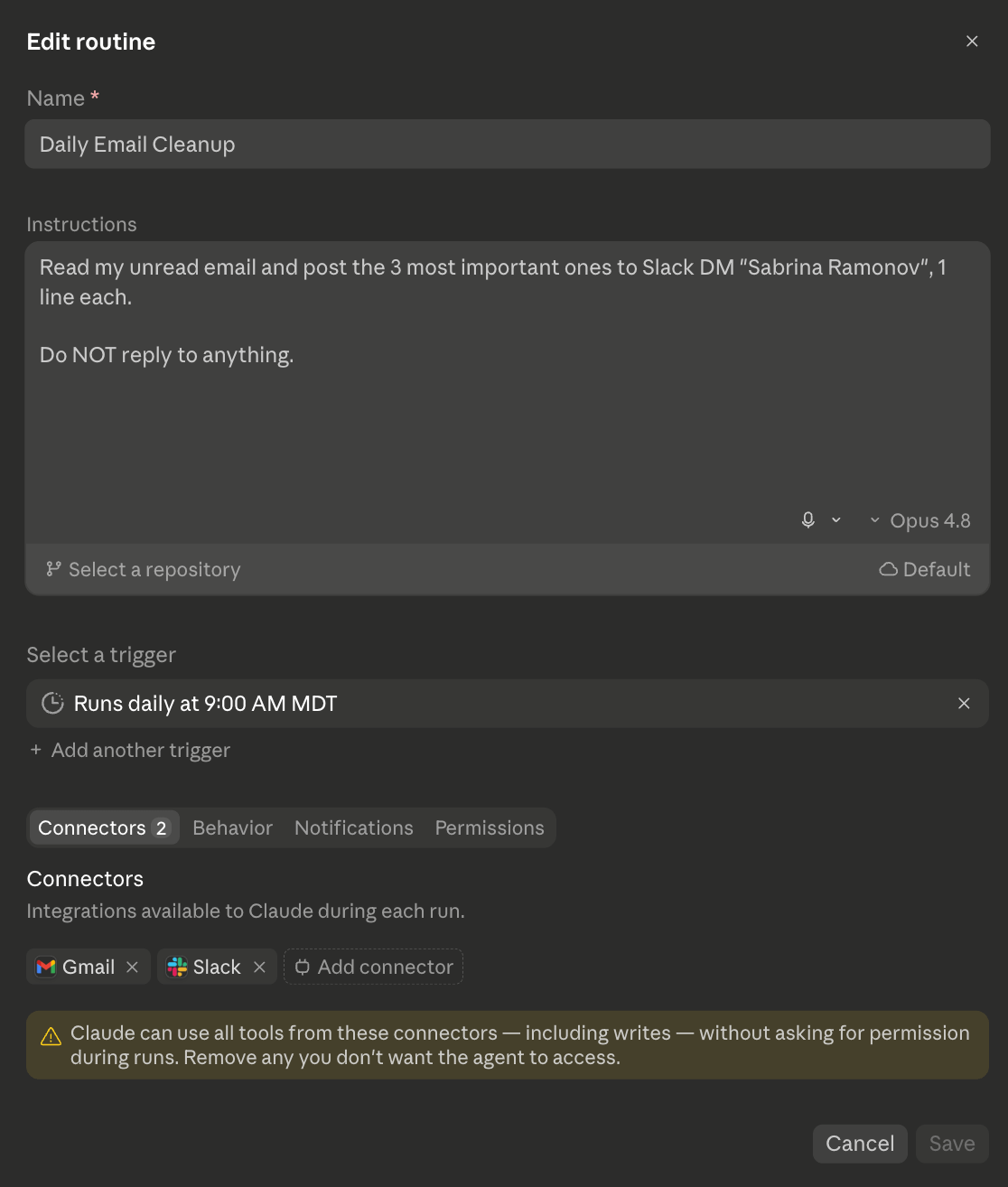
That’s a real autonomous agent.
Every morning at 8am it runs your loop, leaving you a tidy summary.
Intermediate Level Examples
Buried under 10,000 unread emails? “Sort my inbox, label what matters, and trash the junk.”
Dreading that monthly report? “Every month, pull the numbers and write the first draft of my report.”
Too much news to keep up with? “Every Monday, read the updates on [your topic] and hand me 1 short brief, so I stop scrolling.”
Pick the one that you resonate with.
Make your first routine.
Next Level
Here’s my real example of a customer support agent routine, “Daily Support Ticket Cleanup”:
The Skill: in the “Instructions” box I write “Run the ‘cleanup-tickets’ skill on all open customer support tickets, using Intercom API.” That
cleanup-ticketsskill is my saved know-how, so it handles tickets MY way every time.The Repository: I have a github project called help.blotato.com which serves as the memory, or notepad.
The Connectors: in the “Connectors” tab I turned on Intercom and Slack, so it reads real support tickets and posts updates to my real Slack channel.
The Schedule: it runs every day at 8am on its own.
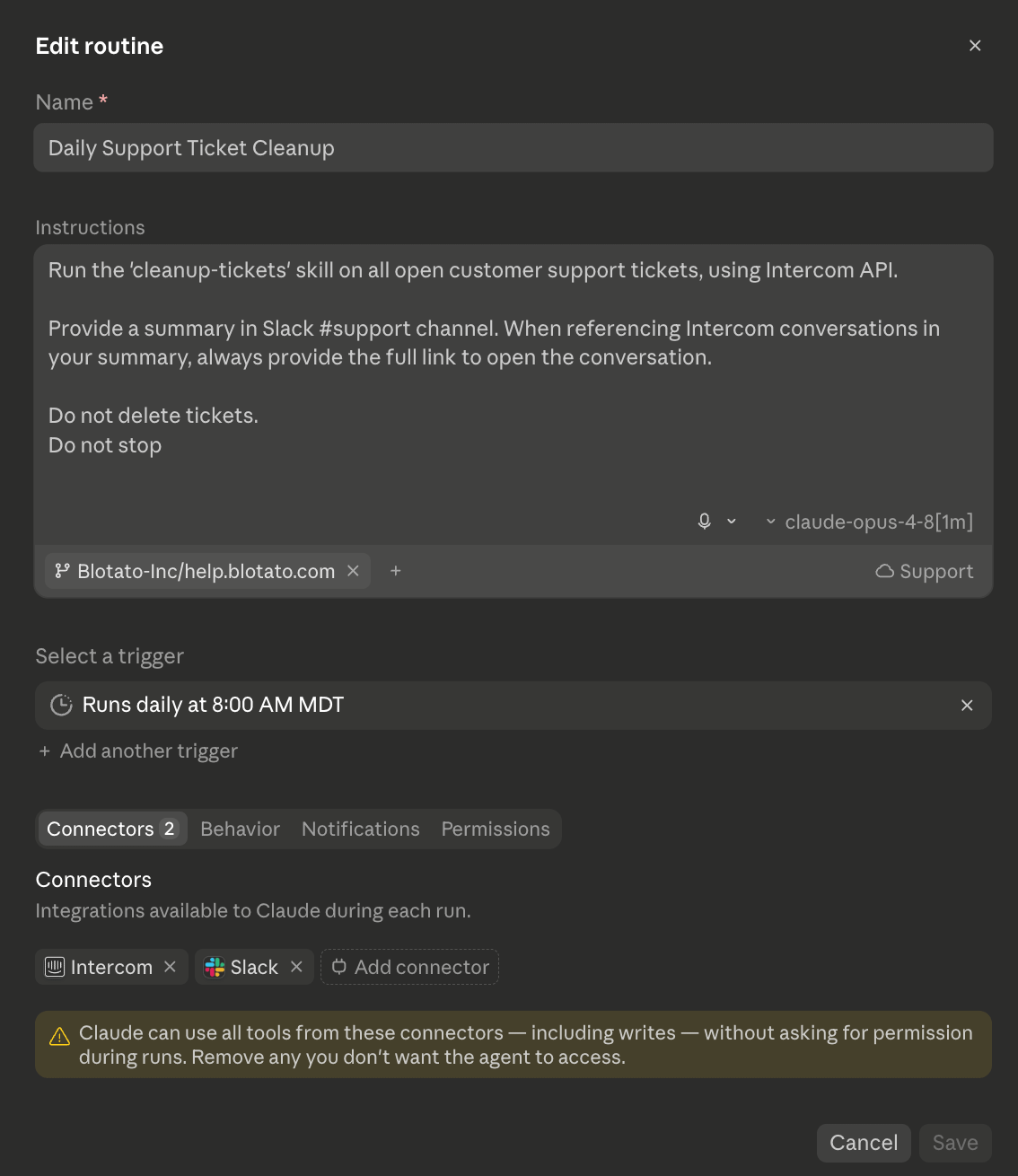
And here’s my CHECKER agent, which independently reviews the work of the primary agent closing the tickets.
If the checker decides an auto-closed support ticket should remain open for human escalation, then it will re-open it.
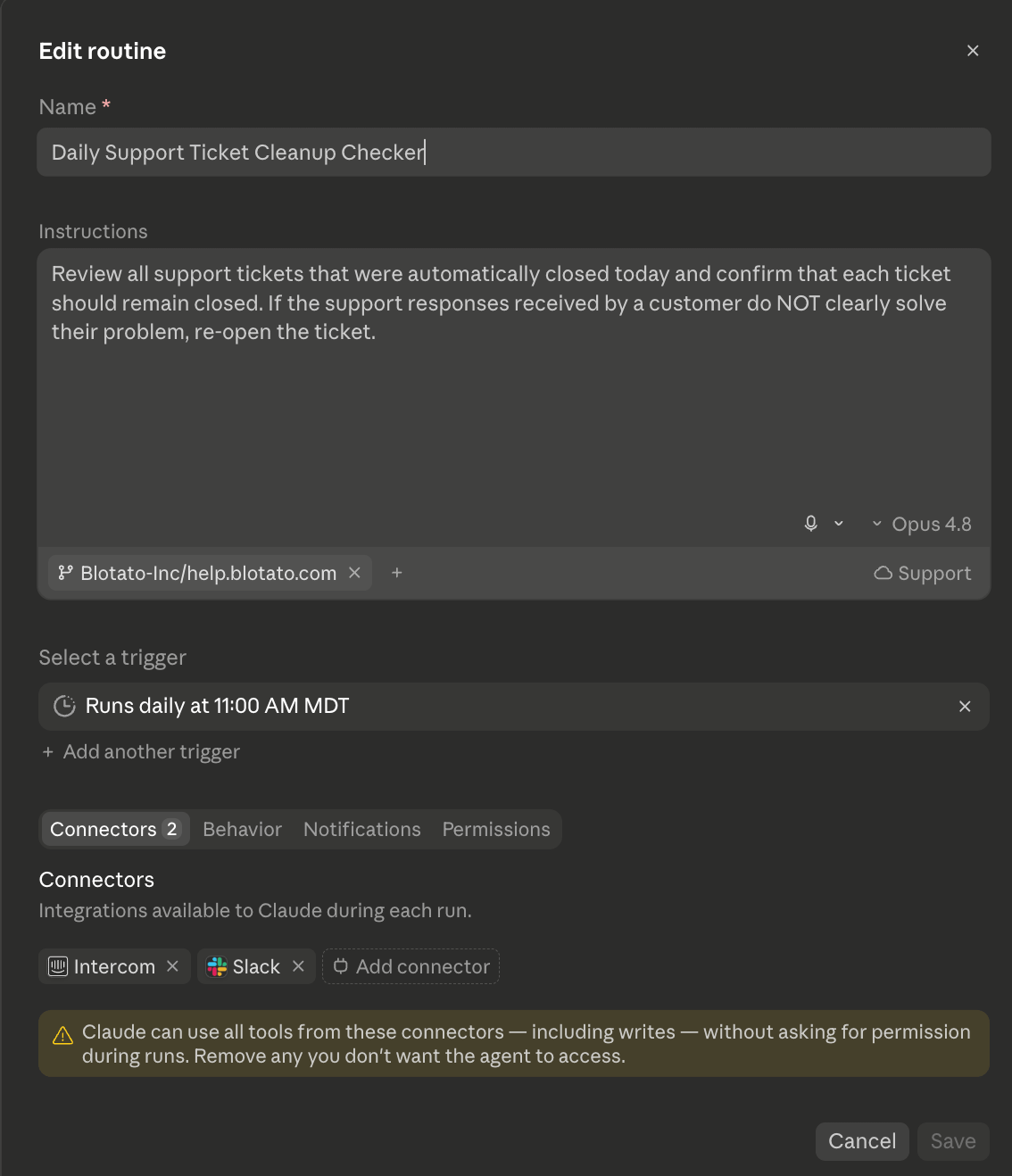
Next Level: Integrate Any Tool with API keys
Connectors only cover tools that already have a plug-in.
But a routine also lets you add your own secret keys as “environment variables.”
Translation: paste in the API key for ANY tool, and your AI agent routine can use that tool too.
For example, in the support cleanup routine above, I created an environment called “Support” and added my Intercom API token. This allows my agent to use the full Intercom API, not just the limited tool calls available in Intercom MCP.
A few things before you trust it:
Start read-only. Have it SUMMARIZE for a few days before you let it change or send anything.
Set the limits in plain words, like “do not reply” or “do not delete.”
Routine runs use the same plan as your normal Claude, and there’s a daily limit in settings.
Cheatsheet 3
Ship 1 tiny routine this week.
Runs when: __________ (every morning? when an email arrives?)
What it does: __________
Tools it needs (connectors & API): __________
The 1 limit: __________ (“don’t reply”, “don’t delete”)
Start read-only.
Let it SUMMARIZE for a few days before you let it edit anything.
RECAP
All 3 pieces we’ve covered:
Loop engineering is the shift from typing prompts to designing the loop. Osmani’s definition has 6 parts: automations, worktrees, skills, connectors, sub-agents, and memory.
/goal is the “goal it can check” part. Claude works to a finish line and stops itself when it gets there.
A routine is the timer (plus the skill, the connectors, and your API keys). It runs the loop in the cloud without you. That’s your first autonomous agent.
The hard part is saying clearly what “done” looks like, and capping the loop so it can’t run away.
This is why my personal formula is always:
AI Leverage = Your Skill x Your Clarity
Clarity: your ability to define what “done” looks like
Skill: your ability to review the work to improve the loop
FAQ
What is loop engineering in simple terms?
It’s designing a small system that prompts an AI on a schedule and against a goal, instead of you typing each prompt. The loop is: do the work, check it, repeat until done. Your role moves from doing every step to designing the system.
Do I need to know how to code to do this?
No. The routine in step 3 is set up in your browser with plain instructions. Only the /goal command in step 2 needs the Claude Code app, so it’s marked ADVANCED.
What does the Claude Code /goal command do?
It gives the AI a finish line and keeps it working until that finish line is met. A small fast AI checks after each round whether it’s done. You need Claude Code version 2.1.139 or newer. Type /goal clear to stop early.
How do I build an autonomous agent in Claude Code?
Create a routine at claude.ai/code/routines. Write plain instructions, turn on the connectors it needs, pick a schedule, and click “Create”. It then runs on its own in the cloud.
Can a routine use tools that don’t have a connector?
Yes. Add that tool’s API key as an environment variable in the routine, and it can reach almost any online service. This part is more advanced.
Is it safe to let a routine run on its own?
Start read-only. Have it summarize for a few days, set plain limits like “do not reply” or “do not delete,” and watch the first few runs before you trust it with anything that sends or changes things.
P.S. Need More Help? 👋
1/ Free AI courses
2/ Free AI prompts
3/ Free AI automations
4/ Free AI vibe coding
5/ Ask me anything @ Friday livestream
6/ Free private community for Women Building AI
7/ I built Blotato to grow 1M+ followers in 1 year
Thanks for this. Live was very helpful. You are very genuine and uncorrupted, and it shows. Please keep doing what you're doing, aka, LEADING WITH VALUE. A great lesson for us all. Cheers! 🍻
Thank you, Sabrina, for this opportunity to learn!
I have to read this post of couple of times, to understand everything, but I won’t give up!
After all, it was my dream!
And dreams sometimes come true.