

In this 3-part video series, I’ll teach you everything you need to know to start building AI Automations in n8n.
It’s difficult to learn this skill via passive reading, so please follow along this Youtube tutorial:
To support my free AI education: HIT LIKE + LEAVE A COMMENT🙏
What is the workflow?
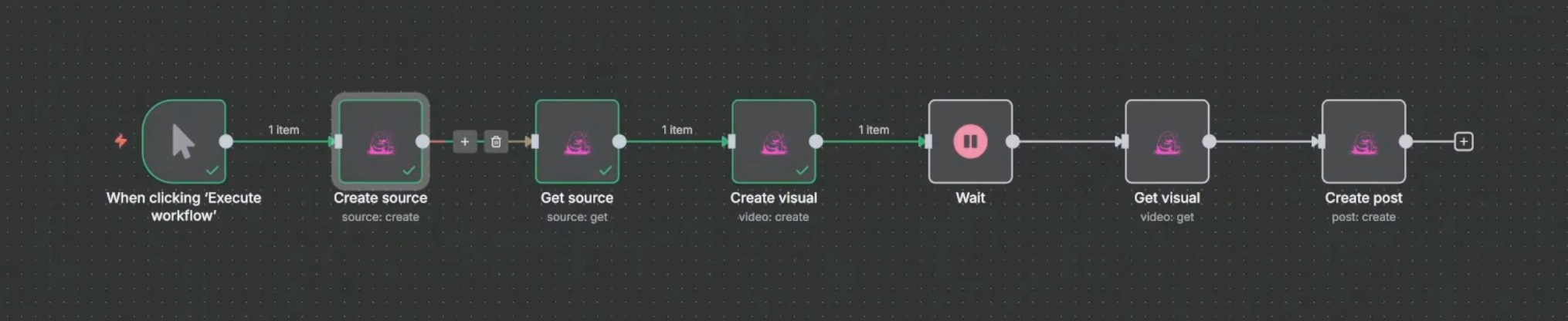
Use AI to research topic
Use AI to make carousel/video
Post to social media platforms
Who is this for?
Small businesses that want to consistently post on socials
Creators who want to repurpose their Tiktok/Youtube videos into different media format (e.g. video → carousel)
Building personal or faceless brand channels
Posting daily news updates to your audience
Entertainment style faceless videos
Next Steps
This tutorial walks through the basics of setting up this powerful content workflow. Treat it as a base template.
To improve it further, spend lots of time experimenting with different visual styles and text outputs.
In the next video, I’ll show you how to use the n8n AI Agent.
OIdies But Goodies…
Here are previous tutorials you may have missed!
P.S. Need More Help? 👋
1/ Free AI courses
2/ Free AI prompts
3/ Free AI automations
4/ Free AI vibe coding
5/ Ask me anything @ Friday livestream
6/ Free private community for Women Building AI
7/ I built Blotato to grow 1M+ followers in 1 year
Eager to learn, thank you for creating free AI education!
Thank you! I’m currently self-hosting n8n on Hostinger. I’ve found it to be glitchy and I have to keep signing back in to keep workflows active or online. Would the n8n subscription through their own platform fix that?