

TLDR: Here’s the exact 5 step setup to make faceless AI videos without a monthly Higgsfield subscription to market your app: 1 free Claude skill that generates viral videos through Kie for ~75 cents and 1 app that publishes everywhere, without getting your social media account banned. I show every step, the cost per video, and how to post successfully on socials.
If you want to make viral faceless AI videos, everyone sends you to Higgsfield. It’s good. But way overpriced. Roughly $15 to $129 a month, monthly billing, depending on your tier.
You don’t need it.
One free Claude skill makes the SAME videos, using the SAME AI models, and you only pay for what you generate.
Check out my viral Twitter article here:

Already proven it can make viral videos getting millions of views.
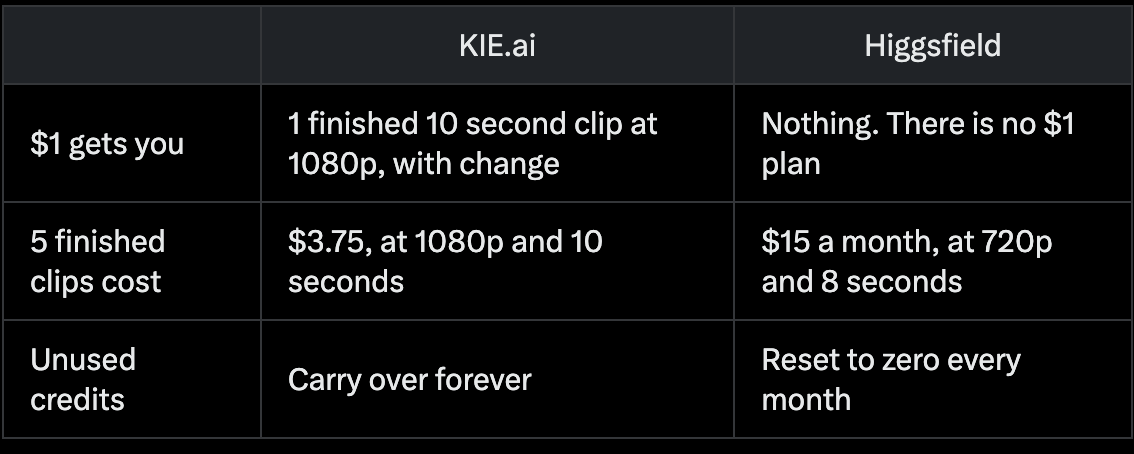
An image costs a few cents.
A video costs about $0.75.
No monthly bill.
Here’s what $1 buys:
You’ve seen the faceless videos. ‘POV: you wake up as a caveman.’
Millions of views.
Meanwhile, the product you spent months building is sitting at 9 signups and $90 MRR 😭
You shipped.
And then nothing.
Posting into the void.
Getting people to see the thing you built is hard... nobody teaches you.
By the end of this guide, you’ll have your own viral faceless video engine: cinematic videos that put your product in front of millions, without ads, without showing your face and without becoming a marketer.
Some context first
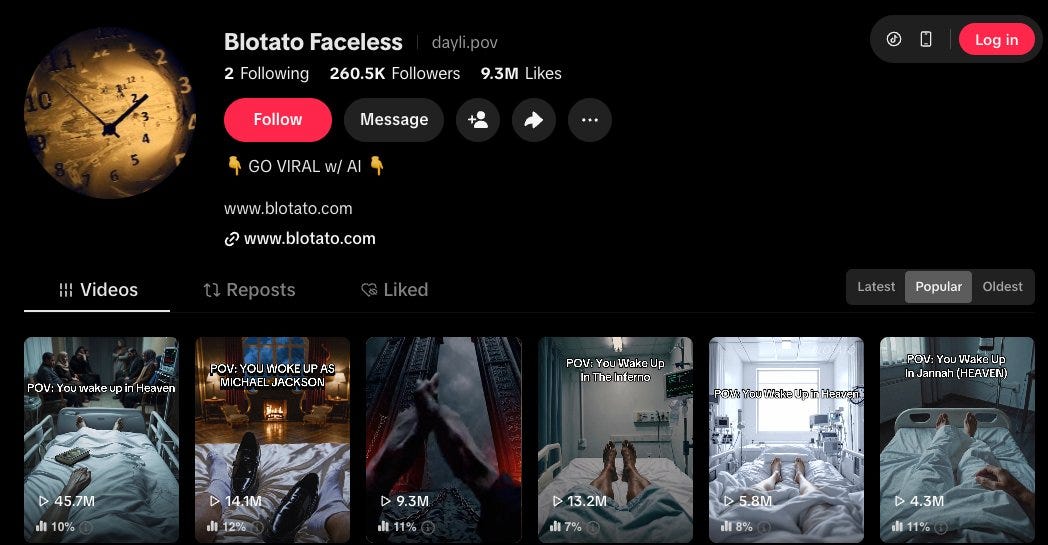
I own this faceless channel with 260.5k followers and over 100M+ views, 100% faceless.
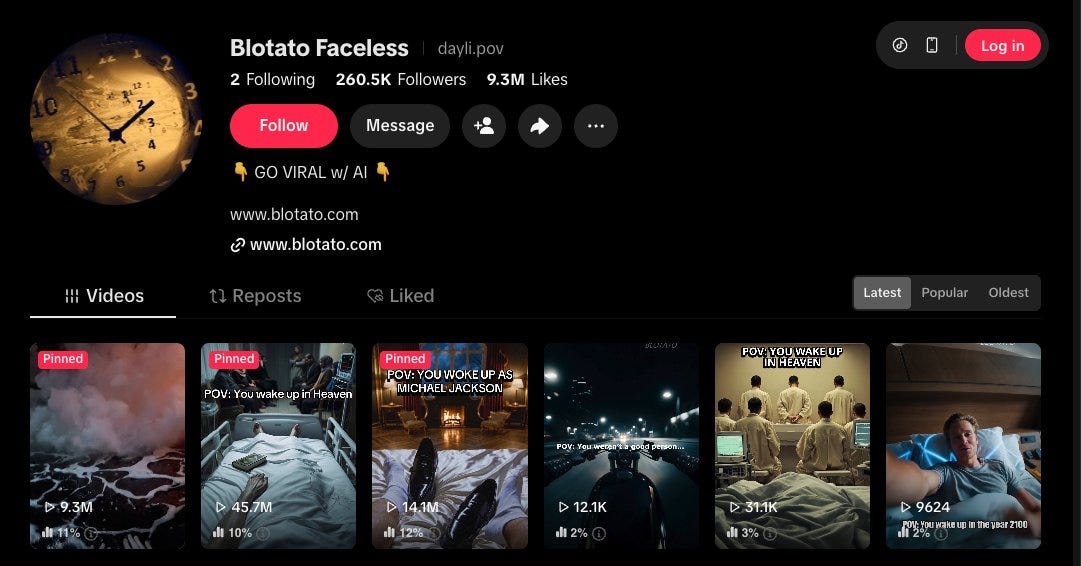
Screenshot 1. Tiktok Profile Faceless latest
Today, you can build the same thing with Claude, one free skill and media generation that costs about $0.75 per clip.
Same format, much cheaper engine.
If I were starting from zero this week, here’s exactly how I’d do it.
And btw, “POV first person cinematic” is just one format. I’m using it as an example throughout this guide, but you can generate ANY faceless format.
So, I created a few different presets you can start with:
A problem then a solution clip where your app is the fix.
A before and after that shows the result.
A ‘5 tools for [x] countdown’ with your product at number 1.
A relatable short story.
Match the format to what you’re selling.
A faceless channel is great cheap advertising for your own product.
Put a small watermark on every video, then when one pops, that’s millions of impressions for whatever you’re building. Then replicate multiple similar videos with the proven viral format.
However, one caveat: if you’re chasing platform rewards, Tiktok’s Creator Rewards Program only pays on videos 60+ seconds. YouTube Shorts has no minimum.
So, this article is about the other route, i.e. using faceless videos to market your own stuff, so everything here is built for short clips.
Or even better, skip the watermark and just show your product in the video. CalAI does this better than anyone, always organically showing their product within the first 12 seconds, instead of overtly talking about it. This converts better than watermarks.
Or keep the video clean and just put the offer in your bio.
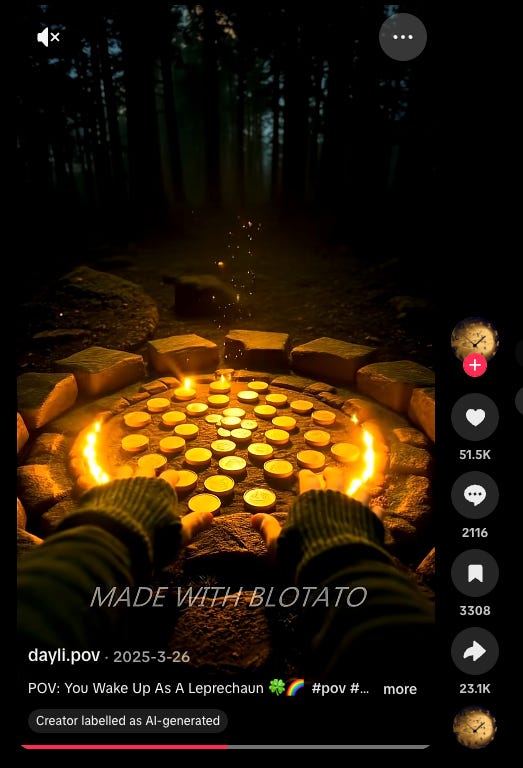
Screenshot 2: you can show your watermark like this
What you need
An AI agent. Claude Code, Codex, Hermes, or Openclaw, all work great . Any agent can read the skill, OpenClaw included. The skill is a SKILL.md file on the agentskills.io open standard, so it also runs in OpenClaw, Codex CLI and Hermes. Drop the folder into that agent’s skills directory.
The /generate skill, download below. One free skill I built from RoboNuggets’ guide (shout out@robonuggets). It takes your prompt, picks the cheapest model that can do the job, generates the image or clip, and saves every file in one folder so you own it. I extended it so that it also quotes the cost, waits for your approval before running, and has a few video template presets.
1 API key to access the best video, image and music models. There are optional fallbacks. All pay as you go, you only pay per generation:
KIE.ai, the cheapest route, and the best one to start. Credits don’t expire.
fal.ai, the biggest model catalog and the best docs, your first fallback. Credits expire after a year.
WaveSpeed, a broad catalog fallback if others fail. Credits never expire.
Blotato.com to publish. Posts to every platform (TikTok, Instagram, YouTube, Facebook, Threads, Bluesky, Pinterest, X) through a REST API or MCP, so your agent drives it. It also includes DM automation, messaging, comments, and social media analytics.
A warmup routine. Keeps a brand new account from getting flagged the second you automate it. Free playbook at the end.
That’s it.
Let’s get into it.
Step 1: The generation tool (KIE.ai) + 1 free Claude Skill
KIE.ai is a pay as you go aggregator to most of the same models that tools like Higgsfield run under the hood.
You just load credits and spend as you generate.
Credits don’t expire. KIE only charges you when a generation SUCCEEDS.
If it fails? FREE.
Say you post 5 videos a week. That’s 20 videos a month, 10 seconds each.
Here’s what it would cost you:
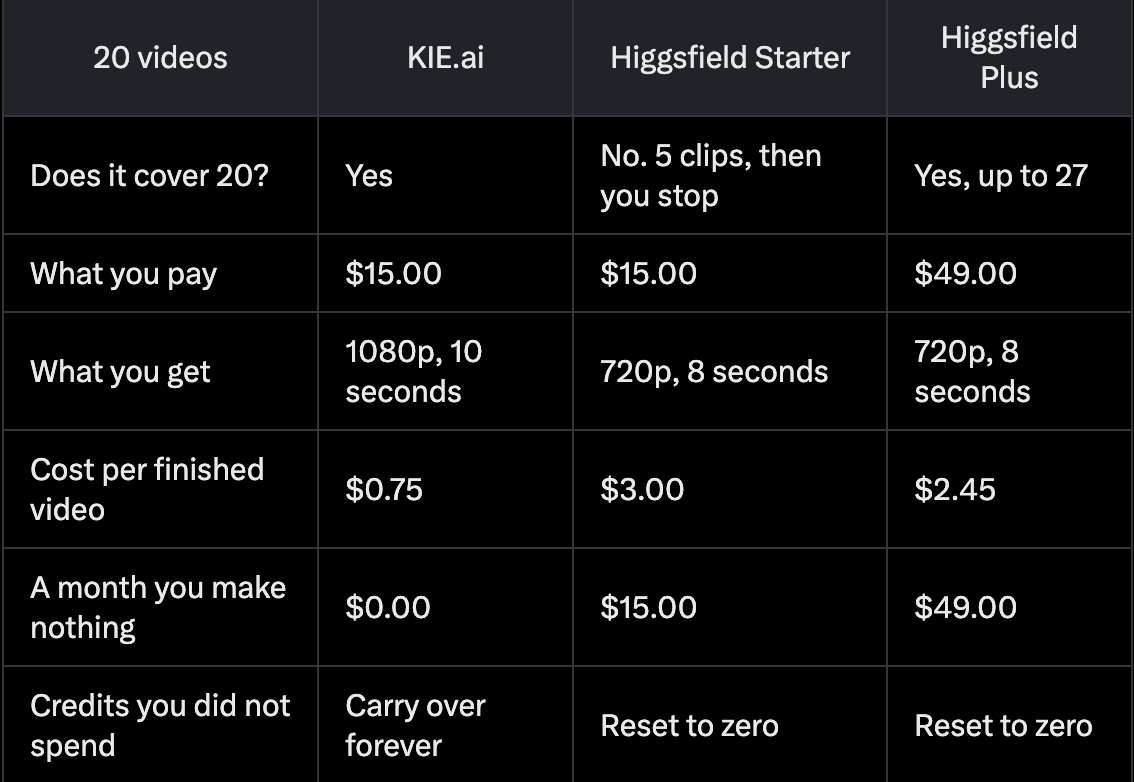
Look at what the same $15 buys.
KIE: 20 clips at 1080p.
Higgsfield Starter: 5 clips at 720p and then you wait for the next month.
And if you don’t make any videos, you STILL pay full price.
And the credits you didn’t use are GONE.
Higgsfield prices are monthly billing.
KIE delivers 1080p for less than Higgsfield charges for 720p!! 🙄
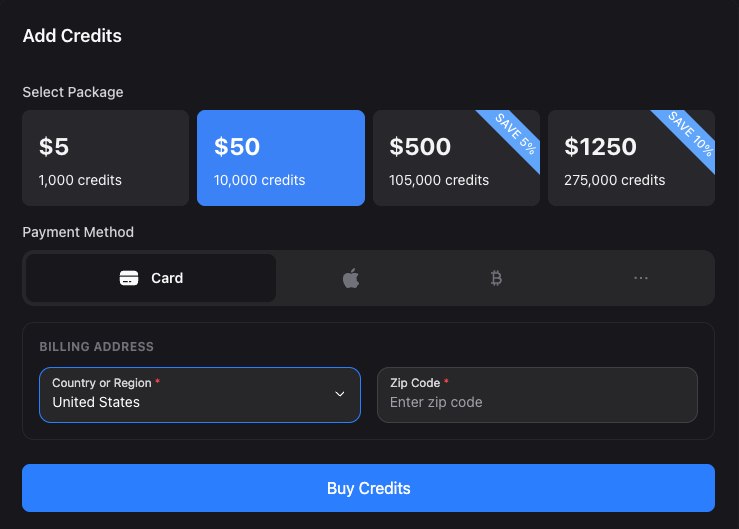
Screenshot 3. KIE add credits page
If you’re using image to video generation like I did (it’s cheaper this way), then you’d need 2 models for the two jobs.
And the /generate skill picks between them for you:
Image: Nano banana for most frames cost a few cents each. Use gpt when there is readable text or an app screen in the shot. It holds letters and UI without smearing them.
Video: Seedance. The skill routes to 1.0 Pro for standard clips at about 7 cents a second, and steps up to 2.5 when you want the newest model.
The /generate skill reads your prompt, routes to the cheapest best-fit model, generates the image, and saves it in a local folder, so you own everything.
Before spending money, it gives you the exact price and waits for your approval. No surprises!
How to set up
Get a KIE API key from KIE.ai, then top up billing $5 to prove it works or $50 if you plan to run a channel, since the credits never expire.
Install the /generate skill into Claude code. This lives in your skills folder and loads in every project automatically.
Ask Claude to create a folder for your generations and paste your KIE key into its .env file.
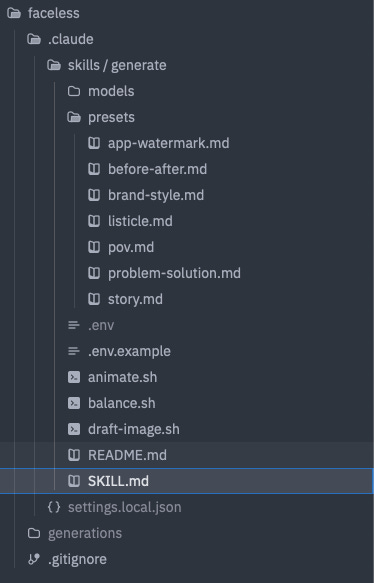
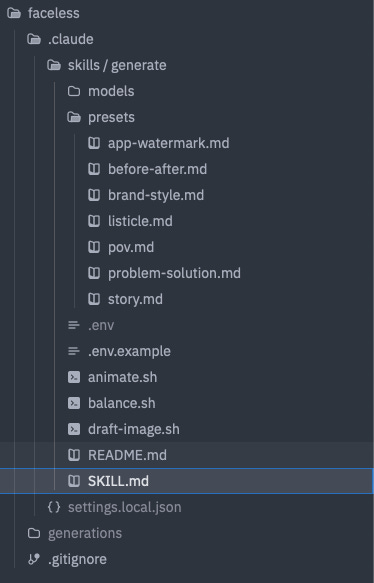
Screenshot 4. Folder tree of faceless project
---
name: generate
description: Generate faceless video content cheaply and consistently. Draft a still on a cheap model, run a pre-animate quality check, then animate the approved still through kie.ai, always routing to the lowest cost model. Enforces a running spend cap with a cost ledger, applies reusable style and character presets so a whole channel stays consistent, and outputs a publish-ready clip that hands off to Blotato for scheduling. Triggers on /generate, generate image, generate video, make a POV clip, animate this.
allowed-tools: Read, Write, Edit, Bash, Glob
---

# /generate

Make faceless video content for pennies, keep a channel visually consistent, and never blow the budget. Draft a cheap still, check it before you spend on animation, then animate only the still you approve. Output lands publish-ready.
Built for vertical social video (9:16). It includes: a running budget ceiling, reusable presets, and a quality gate plus a Blotato publish hand-off.

## Models

| Task | Default model | Provider | Recipe |
|---|---|---|---|
| Image (default) | nano-banana-2 | kie.ai | models/nano-banana-2.md |
| Image (text or UI in frame) | gpt-image-2-text-to-image | kie.ai | models/gpt-image-2.md |
| Video (DEFAULT) | Seedance 1.0 Pro `bytedance/v1-pro-image-to-video` | kie.ai | models/seedance-1-0-pro-image-to-video.md |
| Video (budget) | Seedance 1.0 Lite `bytedance/v1-lite-image-to-video` | kie.ai | models/seedance-1-0-lite-image-to-video.md |

| Video (newest, EXPLICIT ONLY) | Seedance 2.5 `bytedance/seedance-2-5` | kie.ai | models/seedance-2-5-image-to-video.md |
Read the recipe file before every generation. Use gpt-image-2-text-to-image whenever the frame has readable text, a sign, a poster, or an app UI mockup. Use nano-banana-2 for everything else.
**Video model routing.** Default every standard short vertical clip to **Seedance 1.0 Pro**. Use **Seedance 1.0 Lite** as the budget option. Use **Seedance 2.5 only** when I explicitly ask for it.
**Duration.** Seedance 1.0 accepts **5 or 10 second clips only** — there is no 8-second option. **Default to 10 seconds.** If any other value is requested, **round to 5 or 10 and tell me what you did** (do not fail silently, do not stop).
**Aspect ratio / dimensions.** The clip inherits the input still's exact dimensions. So **the still IS the aspect ratio and the resolution**: generate the still at **1080x1920** (9:16). If the still isn't 1080x1920 the clip won't be either. Seedance 1.0 has no aspect ratio parameter. Do not send one.

## Budget and ledger (never blow the spend)

Keep a running ledger at `generations/ledger.json`. Every generation appends one line: timestamp, model, type, cost_credits, cost_usd, description.
Two caps, editable here:
- SESSION_CAP: $10 per run of work.
- MONTHLY_CAP: $50 per calendar month.
Before ANY paid generation:
1. Sum the ledger for this session and this month.
2. If this run would cross a cap, STOP and tell me how far over, do not generate.
3. Otherwise, quote it like this: "This clip is 140 credits, about $0.70. Spent this session $4.10, remaining $5.90 of the $10 cap. Go?"
One approval equals one run. Never batch paid videos past the cap without a fresh go.

## Pre-animate QA gate (stop wasting video spend)

Video is the expensive lane, so check the still BEFORE animating. These are the real failure modes (wrong ratio gives black bars, drift breaks the illusion):
- Aspect ratio is vertical 9:16.
- Still dimensions are exactly 1080 x 1920 (the clip inherits them).
- No text baked into the image, unless it was made on gpt-image-2-text-to-image on purpose.
- Subject and point of view match the concept and the preset. First person stays first person.
- Requested duration fits the platform (TikTok, Reels, Shorts all take 5 or 10 seconds comfortably).
If any check fails, stop, say which one, and offer to re-draft the still (cheap) rather than animate a broken frame.
You don’t have to build this from scratch.
You can download the whole skill and reference files here:
Where we are: a video generation engine, the free skill that drives it and a REASONABLE price per video!
Next stop, give Claude a format, generate an image, animate it.
My first throwaway test was a POV as a Roman senator waking up.

Screenshot 5. Roman senator POV still
Step 2: Create your image
Draft your image first, then animate the still.
It sounds like an extra step but it saves you money and puts you in control of the resulting video.
On KIE, an image, depending on the model, is a few cents. A finished clip is under a dollar.
Text to video costs the same whether the resulting frame is right or wrong.
Drafting the image first means you can iterate the frame for pennies and only pay for motion once the frame is exactly what you want.
/generate a POV of you waking up as a Roman senator, vertical, cinematic
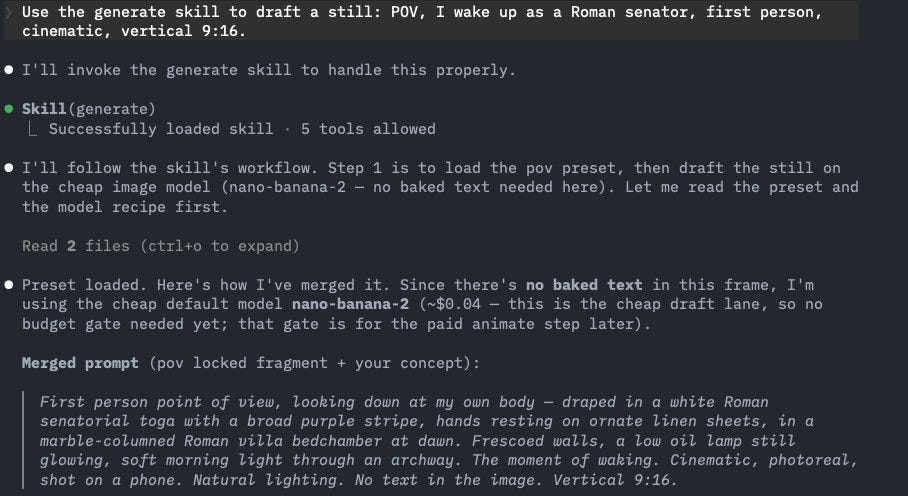
Screenshot 6. how the “generate” skill enhances your prompt using presets
This image cost 8 credits which is 4 cents.
This frame had no text, so it routed to the cheap model.
And the Claude skill captures the cost in your ledger so you can keep track.
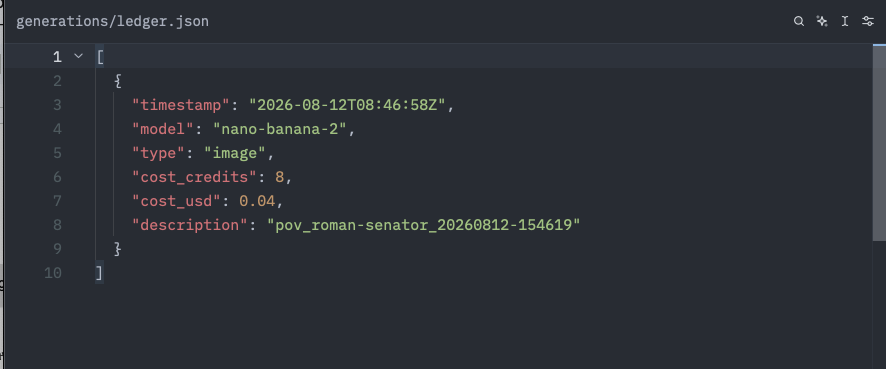
Screenshot 7. ledger - POV roman senator
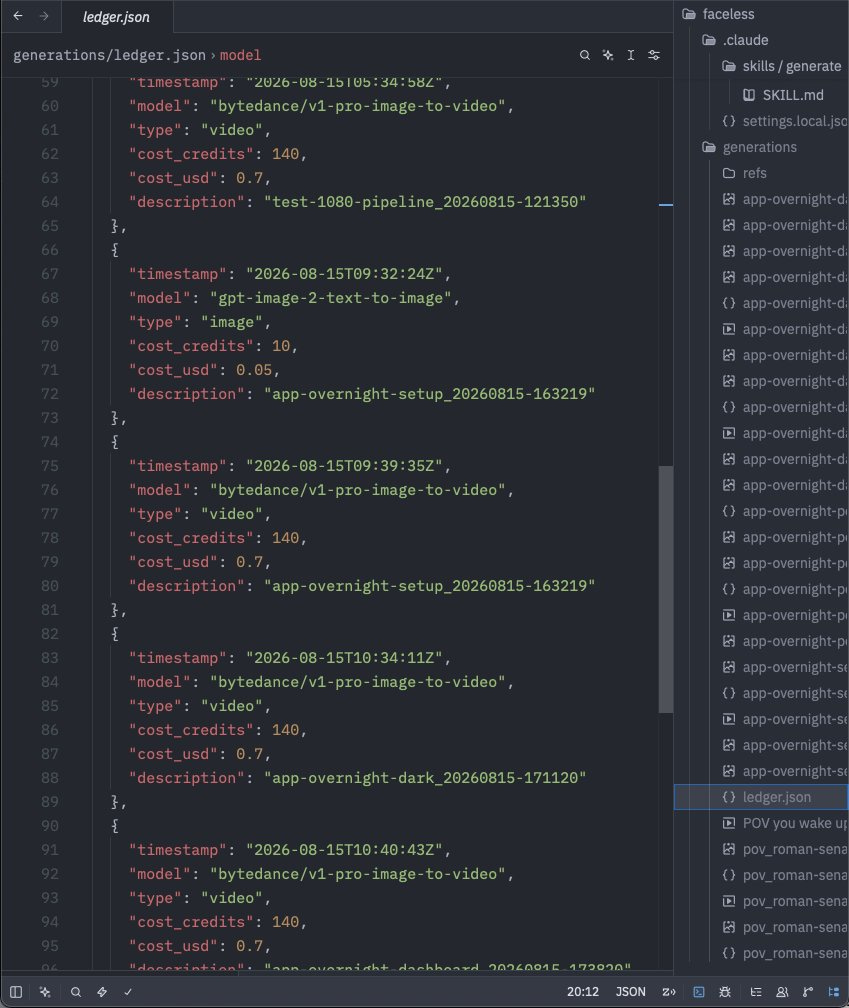
Screenshot 8. full ledger entry tracking multiple generations
Where we are: a frame you actually like, for 4 cents, before you have spent anything on motion.
Step 3: Animate your image
When it came to animate the senator image, my first video failed.
The clip came back as a random landscape. Nothing to do with my senator and KIE still charged me for it.
Technically, the job SUCCEEDED.
It just never read my image.
KIE only charges you when a generation succeeds. Succeeds means the API returned a video.
So the skill checks twice now.
Before it spends, it confirms the still is vertical and 1080 x 1920, because the clip inherits the still’s shape.
After the download, it reads the mp4’s real dimensions and pulls a frame so you can see the clip shows what you asked for.
If either check fails it stops and tells you instead of handing you a file.
I updated the /generate skill to include a check before generating video so you don’t have to worry about that.
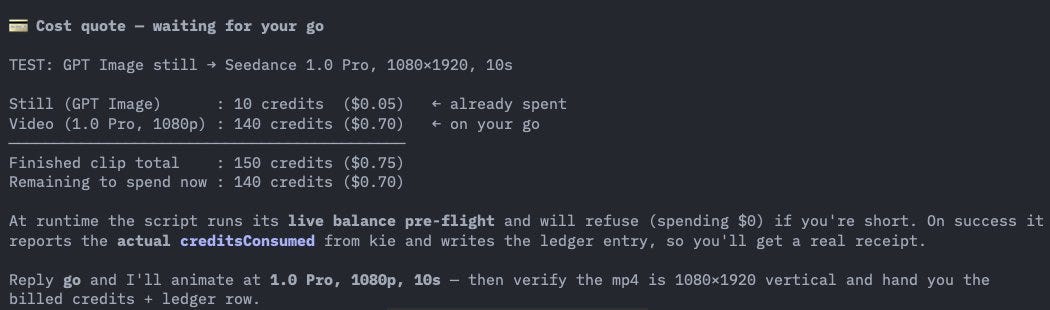
Screenshot 9. Cost quote for test clip 150 credits
Where we are: the end to end works. An image goes in and a matching vertical clip comes out
Step 4: Market your app with it
Now for an actual clip you can sell your product with.
This one is meta on purpose. It shows the exact thing this setup does.
You wake up, reach for your phone and the screen reads,
‘Overnight. 6 posts published. 3 new signups.’
Let’s start with the image.
There is a little dashboard on the phone screen, so this is a gpt-image-2.
I asked the /generate skill for the POV and the first image was wrong. The figure was lying flat as expected but the pose was unnatural.
So we corrected the prompt.
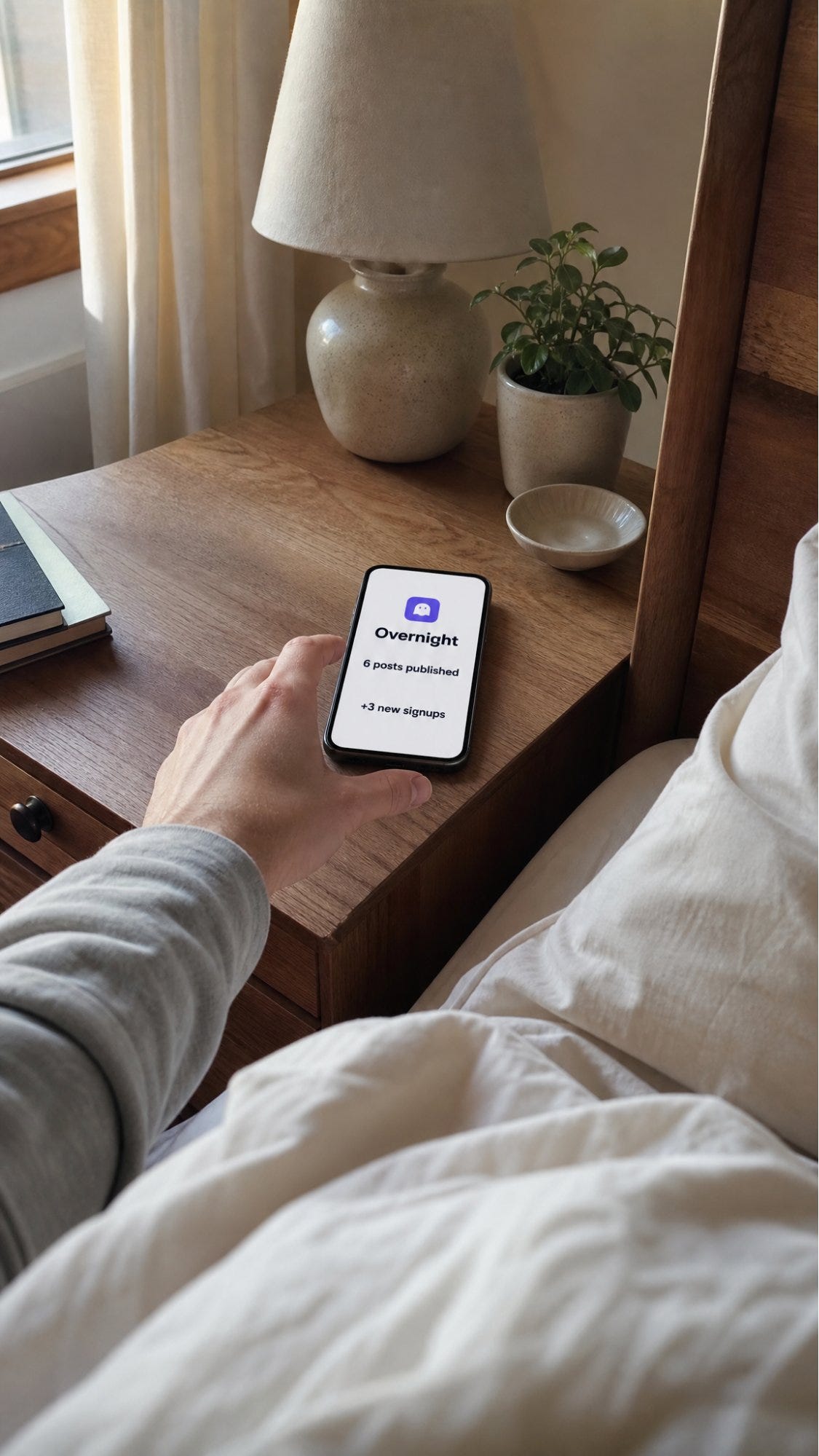
Prompt:
iPhone photo, first person POV, lying in bed just waking, one hand reaching for a phone on a wooden nightstand, soft morning light from a window. The phone screen is on and clearly legible, showing a clean minimal app dashboard: a small rounded app icon at the top, the heading ‘Overnight’, and two lines, ‘6 posts published’ and ‘3 new signups’. Cozy bedroom, shallow depth of field, photoreal, shot on a phone. Portrait 9:16, 2K resolution for crisp on-screen text.
In a real POV, you are looking forward so you see your own legs. To see your phone, you turn towards your side.
Improved prompt:
iPhone photo, first person POV, lying in bed with my head on the pillow, turned to look toward a window on my left where soft morning light comes in. My hand holds my phone, just lifted from the nightstand beside me, raised close to my face with the screen facing me and clearly legible, and not backlit: a small rounded app icon at the top, the heading ‘Overnight’, and two lines, ‘6 posts published’ and ‘3 new signups’. The white pillow and rumpled duvet fill the foreground, the cozy bedroom and window softly blurred behind the phone. Shot on a phone, shallow depth of field, photoreal, warm morning light. Portrait 9:16, 2K resolution for crisp on-screen text.
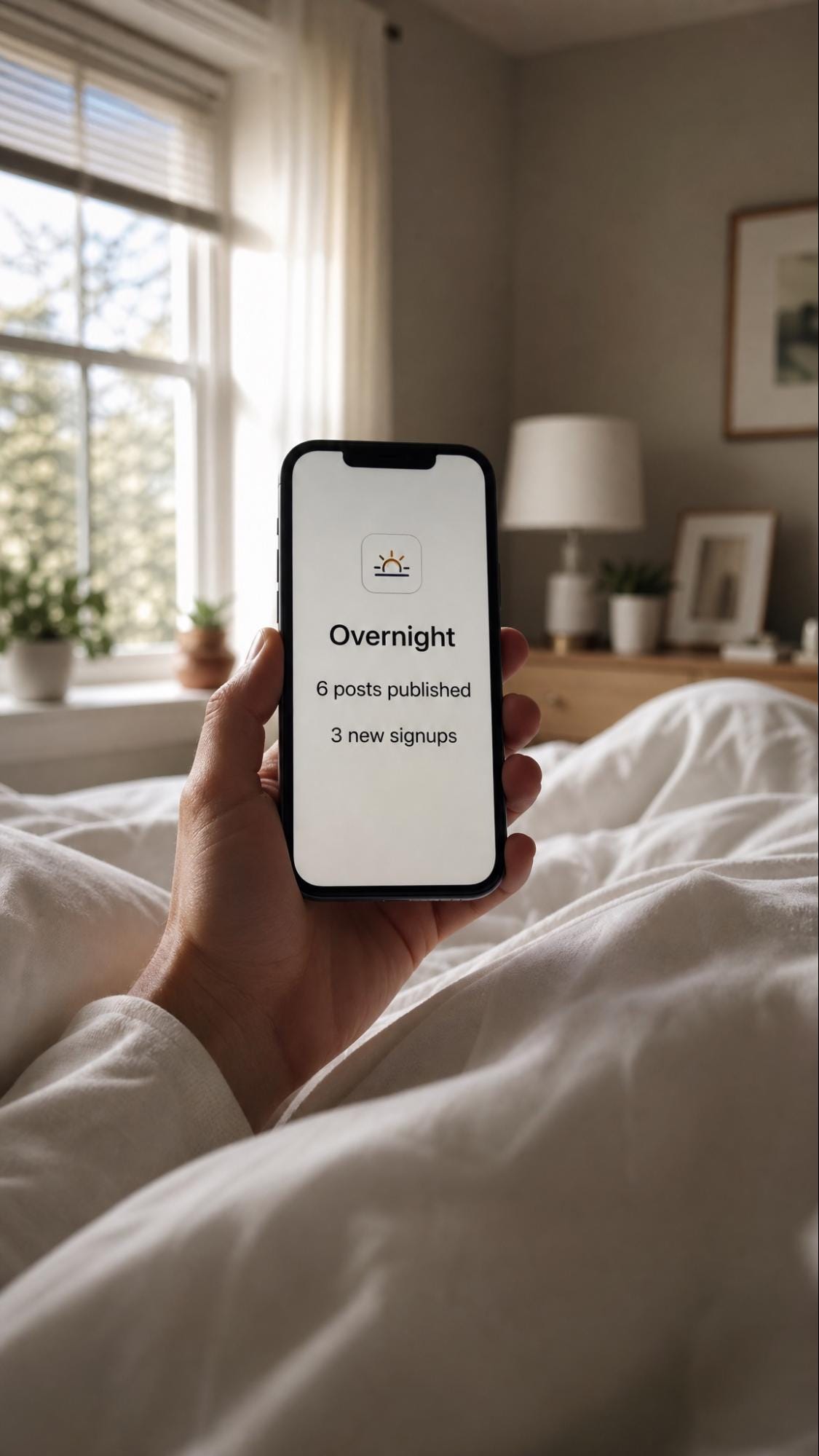
Screenshot 11. Overnight corrected still, hand holding phone, dashboard legible
That still cost 10 credits.
5 cents 😍
Now animate it.
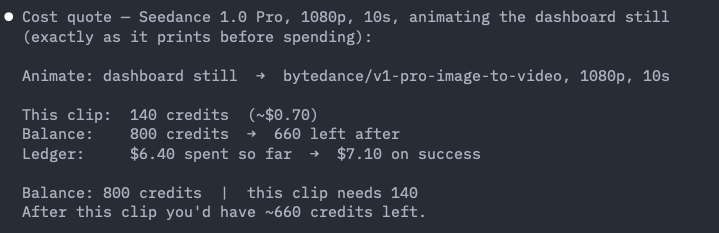
Screenshot 12. Cost quote for dashboard animation 140 credits
The /generate skill quoted the cost first, 140 credits, about $0.70 at 1080p and waited for my approval.
In image to video, the first frame IS the still so it is also your thumbnail. You can adapt this however you want so you don’t give away the payoff but keep the hook.
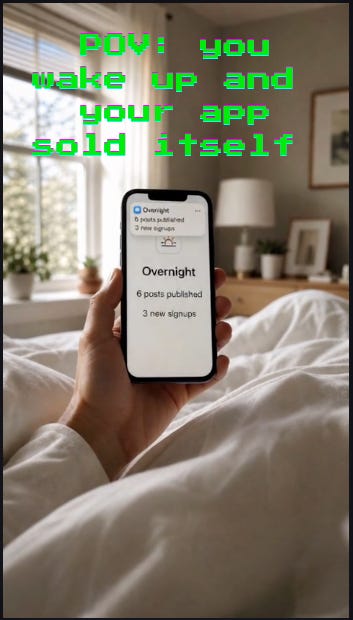
Screenshot 13.POV you wake up and your app sold itself
Where we are: you have a finished vertical clip, 1080p, 10 seconds, made for about $0.75 all in.
Step 5: Publish everywhere (warm up first so you don’t get shadowbanned)
Do NOT connect a brand new account straight to automation. That is the fastest way to get flagged as a bot.
Before you automate anything, treat the account the way a real person would:
Log in daily
Scroll, like, comment and save
Follow accounts in your niche
Post 1 piece of content a day, manually
Then, connect Blotato so your AI agent can publish for you.
Claude.ai chat or Claude Cowork: install the Blotato connector from the Claude.ai Connectors page.
Claude Code, run this in the terminal:
claude mcp add --transport http Blotato https://mcp.blotato.com/mcpthen run `/mcp`, pick Blotato, and authenticate in the browser.
Here are instructions for Codex:
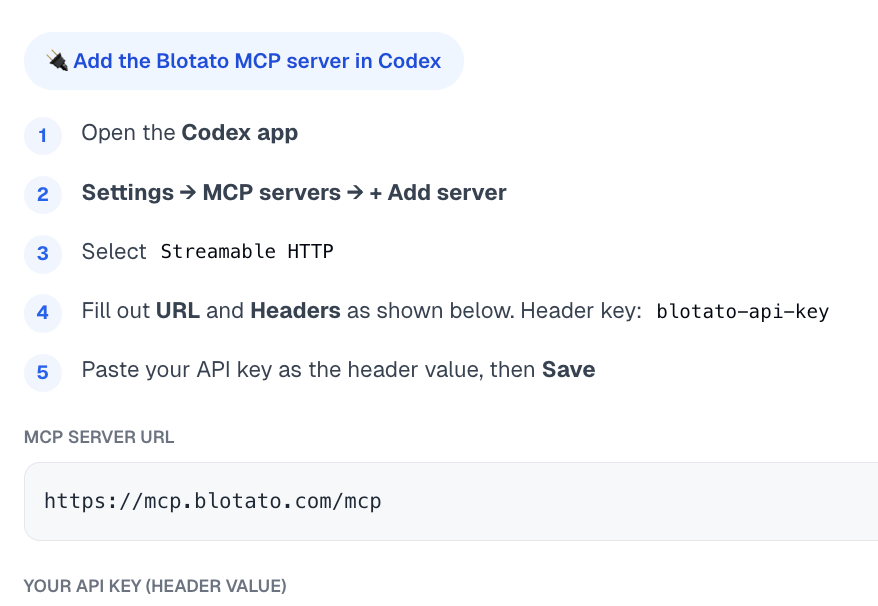
Where we are: a warmed account and Blotato connected, so your agent can publish without being flagged.
Publish 1 video to 1 platform
Just prompt your AI agent:
Publish overnight.mp4 from my generations folder to Instagram. Caption: POV: you wake up and your app ran itself overnight. Schedule it for 5:27pm tomorrow.
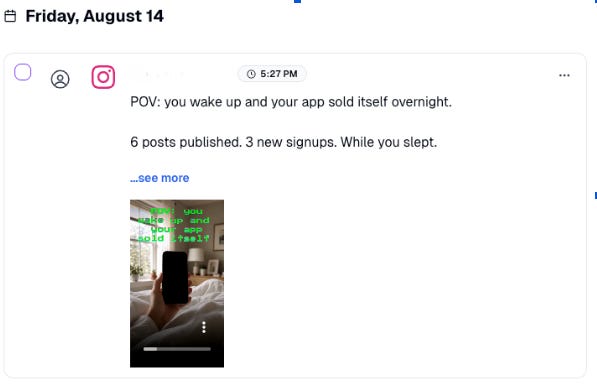
Screenshot 14. Blotato scheduled post Aug 14
Now publish everywhere
Just tell your AI Agent:
Publish to YT shorts, Tiktok, Threads, and Facebook too.
Blotato handles it all automatically.
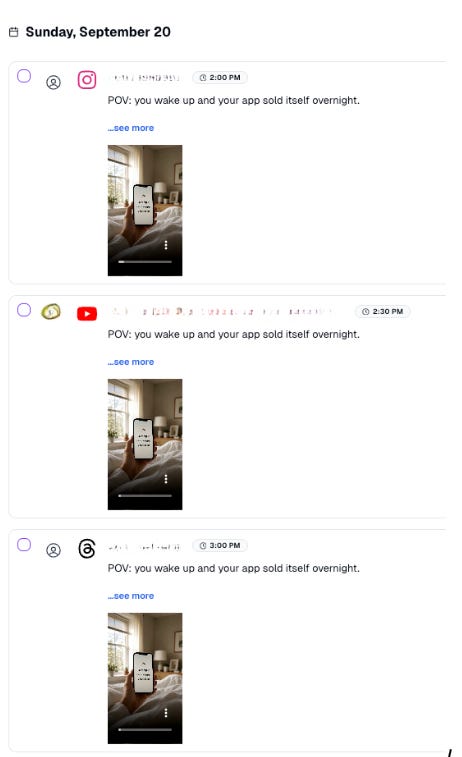
Screenshot 15. Blotato queue IG YT Threads Sept 20
One link is all your agent needs
Blotato ships a page written for AI agents to read: help.blotato.com/api/llm
It is the whole API spec formatted for an LLM to consume, every endpoint, header, payload shape, and platform specific field, in context.
Point your agent at it and just say what you want to build.
Where we are: 1 video clip scheduled on all your platforms and a bookmark that lets your agent build the rest with Blotato without you.
The numbers (as of today)
45.7M views on 1 video
260.5k followers
9.3M likes
Set this up yourself (copy this)
Here’s your worksheet, start to finish:
Get a KIE.ai key and top up under Billing. $5 to test, $50 to run a channel. Credits never expire, and KIE only charges when a generation succeeds.
Download my /generate skill. Install it into ~/.claude/skills/ (or ~/.openclaw/skills/, ~/.codex/skills/, ~/.hermes/skills/). It routes to the cheapest model, tells you the cost, waits for your approval, and stores every image/video in one folder.
Draft an image for a few cents, then animate with Seedance. Roughly $0.75 per finished clip.
Connect Blotato to automate social media posting & analytics: `claude mcp add --transport http Blotato https://mcp.blotato.com/mcp`, run `/mcp`, hit Authenticate. Then just say “schedule this to TikTok, Reels, and Shorts.”
Building your own agent? Point it at help.blotato.com/api/llm and it has the whole publishing API in context.
If you need help setting this up or have any questions, feel free to email me sabrina@blotato.com :)
Not Sure Where To Start? 👇
I’ve organized my best trainings below:
Subscribe to my Youtube and hit the “notification” bell
So that you never miss my free trainings 👇
Absolutely love using Blotato!
Bookmarking this one. Skills keep replacing tools I thought I needed.