

These are Claude Code commands that most people don’t know about.
I highly recommend trying each one!
/btw - Run this when claude’s already doing something and it will answer without cancelling its work.
/model - set the model; save tokens
/effort - set the effort (low, medium, high, max); save tokens
/advisor - When Claude needs stronger judgment (a complex decision, an ambiguous failure, a hard problem), it escalates to the advisor model for guidance, then resumes. For non-tech tasks, pairing Sonnet as the main model with Opus as the advisor gives you near-Opus performance with less tokens.
ULTRATHINK - Just type this anywhere and claude will think max reasoning. The keyword should turn rainbow colors.
/caveman - Install this open source skill and cut output tokens substantially.
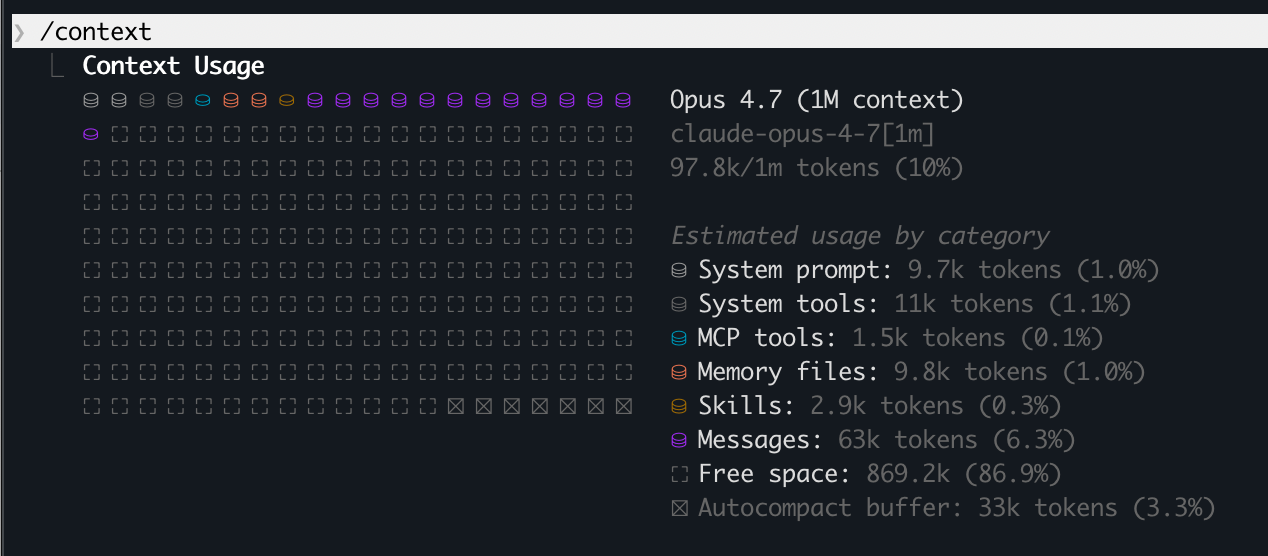
/context - Visualize current context usage as a colored grid.
Shows optimization suggestions for context-heavy tools, memory bloat, and capacity warnings.
I also recommend open-source library “context-mode” to reduce MCP token consumption.
/clear - Run between tasks to clear old context. Helps ensure high accuracy by avoiding polluted/bloated context. Also helps reduce token consumption.
/insights - Claude will analyze all your sessions from past 30 days and suggest how to be more productive, including what’s working, what’s holding you back, quick wins, and specific features to try based on your usage patterns.
/skill-creator - the meta skill that creates skills with evals. Walks you through creating, testing, and improving your own skills - the skill that builds skills. It also benchmarks for reliability. The Benchmark mode runs your skill N times and measures variance. Your skill works once? Cool. Does it work 9 out of 10 times? That’s what benchmark tells you. And it tries to close the loop with Improve mode. If your skill fails 3 evals, Improve mode analyzes the failures and refines the skill. Then it re-runs.
/plugin marketplace add anthropics/claude-plugins-official
/plugin install skill-creator@anthropic.
/team-onboarding - Generate a team onboarding guide from your Claude Code usage history. Claude analyzes your sessions, commands, and MCP server usage from the past 30 days and produces a markdown guide a teammate can paste as a first message to get set up quickly
/loop - runs a task repeatedly in your current session. You give it an interval (/loop 5m /write-post). Dies when you close the session. Good for: polling a build, babysitting PRs while you work, watching a long-running process. Session-scoped, dies when terminal closes. Designed as a safety net against forgotten loops. Minimum 1 minute.
/loop 30m check my Gmail for new emails from clients & give me a one-line summary of each
/schedule - creates remote task that runs independently in the cloud. Fires on a cron schedule (e.g. every weekday at 9am) whether or not you’re at your machine. Good for daily standup summaries, recurring automations, scheduled reports. Daily run caps: Pro = 5, Max = 15, Team/Enterprise = 25. No local file access — each run is a fresh repo clone. Minimum 1 hour.
/schedule 0 9 * * 1-5 research trending AI news using Perplexity and suggest 3 ideas with hooks
/remote-control - Continue session on your phone in Claude app
/rename - Rename session. Useful if RC’ing many sessions.
/resume - Resume a previous session.
Claude Chrome extension. For Claude Code, launch it with “Claude --chrome”.
Automate tedious browser tasks that don’t have an API
Playwright MCP is sometimes better, and it’s free
/rewind - Rewind the chat/code to a previous point, or summarize from a selected message. You see a popup & select a message to “fork” the chat from that point.
/statusline - Status lines are useful when you: Want to monitor context window usage as you work, Need to track session costs, Work across multiple sessions and need to distinguish them, or Want git branch and status always visible
/statusline show model name and context % with a progress bar

P.S. Need More Help? 👋
1/ Free AI courses
2/ Free AI prompts
3/ Free AI automations
4/ Free AI vibe coding
5/ Ask me anything @ Friday livestream
6/ Free private community for Women Building AI
7/ I built Blotato to grow 1M+ followers in 1 year
very handy!