

This Instagram reel generated $120,000 in annual recurring revenue (ARR) for my business.
In this guide, you’ll learn how to do this too.
My workflow is stupid simple.
Anyone can do it.
No coding required.
I open Claude and ask it to create a DM automation for Facebook + Instagram.
Then I tell Claude:
The keyword people will comment.
The link, product, or offer that should be sent.
…and Claude creates it for me!
This is the SIMPLEST way to turn attention into $.
So, let’s dive into a step-by-step tutorial:
Here’s the flow:
Comment → DM → Link
This tutorial shows you 2 ways to build this same thing:
Blotato website: Set it up yourself in the visual automation builder.
Claude + Blotato: Create, edit, and review automations by describing what you want.
Here’s the step-by-step video tutorial:
Before You Start
Choose these 2 things:
Your keyword: ____________________
Your link: ____________________
That is all you need to get started.
Part 1: Make Your First DM Automation
This is the easy path.
We’ll make your first DM automation directly in a website.
1. Create the Automation
Open the Blotato Automations page.
Click the “New automation” button.
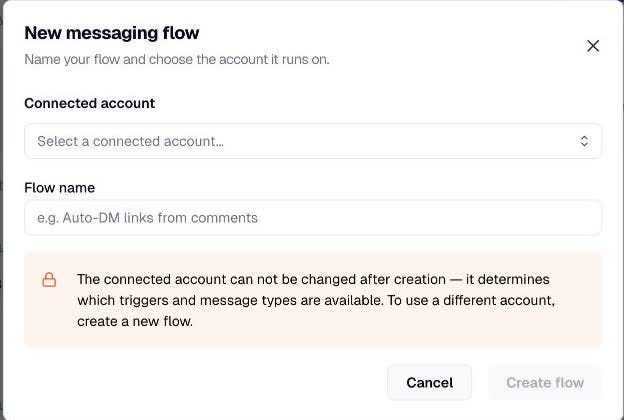
Click the “Select a connected account…” button and choose your Instagram account or Facebook Page.
Type a name, such as “
GUIDE - Facebook", into the “Flow name” field.Click the “Create flow” button.
Typically, you’ll want to create one flow for Facebook and one flow for Instagram.
Each flow belongs to one connected account.
Done: ☐ Facebook flow created ☐ Instagram flow created
2. Choose What Triggers the DM
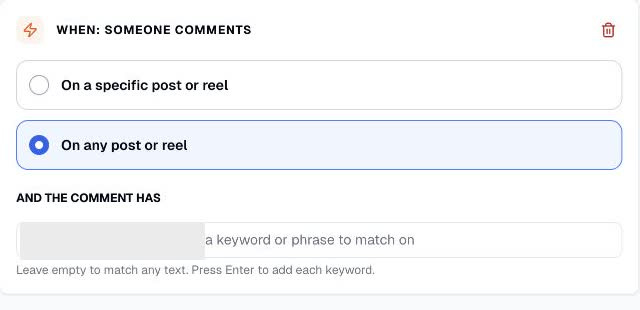
Find the “When: Someone comments” section.
Choose when the automation should work:
Select the “On any post or reel” radio button if you want the keyword to work on every post and reel.
Select the “On a specific post or reel” radio button if you want it to work on only one post or reel you choose.
Type your keyword into the “Add a keyword or phrase to match on” field under “And the comment has”.
Press Enter to save the keyword.
Keywords are not case-sensitive:
"GUIDE", “Guide", and “guide"are all the same trigger.
Check: ☐ Correct account ☐ Correct posts ☐ Correct keyword
3. Write the DM
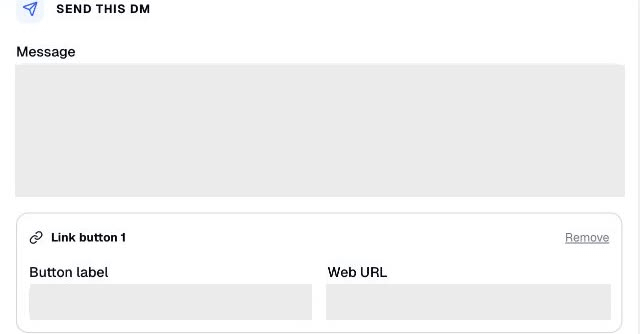
Find “Send this DM” and type your reply into the “Message” field.
Example:
Thanks for commenting GUIDE!
Tap below for the free guide I promised.
Under “Link button 1”, type what the button should say into “Button label”.
Paste your link into “Web URL”.
4. Publish and Test
Click the “Save” button.
Click the “Publish” button.
Confirm the status changes from “Draft” to “Live”.
Sign in to a DIFFERENT Facebook or Instagram account.
Comment your keyword on the post.
Confirm the DM arrives.
Open the link and confirm it goes to the right page.
Important: Your own comments will not trigger the automation. Always test from another account.
Final check: ☐ DM received ☐ Correct link opened
Part 2: Automate DMs with Claude or ChatGPT
Now let’s do the same thing, but your favorite AI agent will drive the process.
So, you won’t have to waste time clicking manually!
Comment → DM → Link
Before you start, choose:
Your keyword: ____________________
Your free offer: ____________________
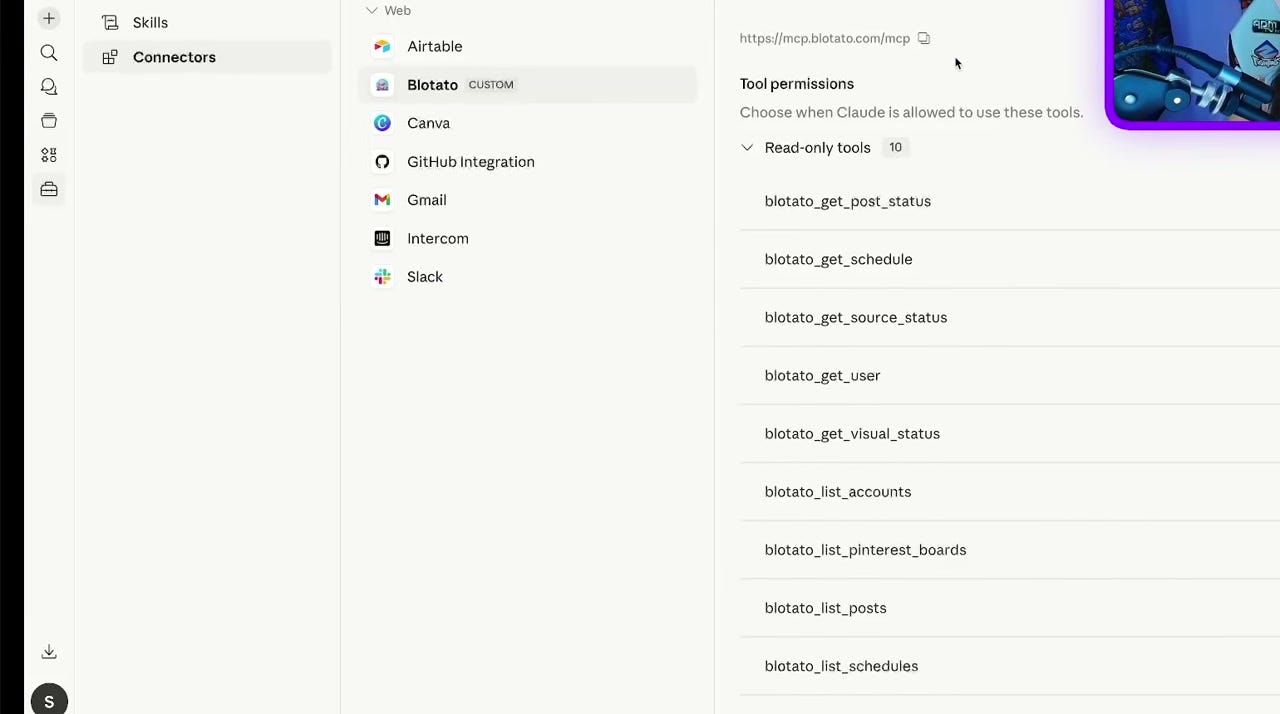
Step 1. Connect Blotato
Open Blotato Settings → API.
Follow the setup steps for Claude or ChatGPT Work.
Ask:
List my connected Blotato social accounts.
Do not move on until you see your Facebook and Instagram accounts.
Step 2. Create DM Automation
Copy and paste this prompt into Claude or ChatGPT Work:
Create a Facebook and Instagram DM automation. When someone comments GUIDE on any post, send my free guide: [URL].
On Instagram, ask them to follow first.
Replace GUIDE with your keyword.
Replace [URL] with the link to your offer.
I often create DM automations that send people to:
New tools
Promo deals
Interesting news
My Youtube videos
My past newsletters
Check these 3 things:
The correct Facebook and Instagram accounts are selected.
The keyword is correct.
The DM clearly explains what the person will receive.
Open the Blotato Automations page to see all your DM automations.
Everything stays synced between Blotato and Claude.
Changes made in one place will appear in the other.
Done: ☐ Accounts checked ☐ Keyword checked ☐ Message checked
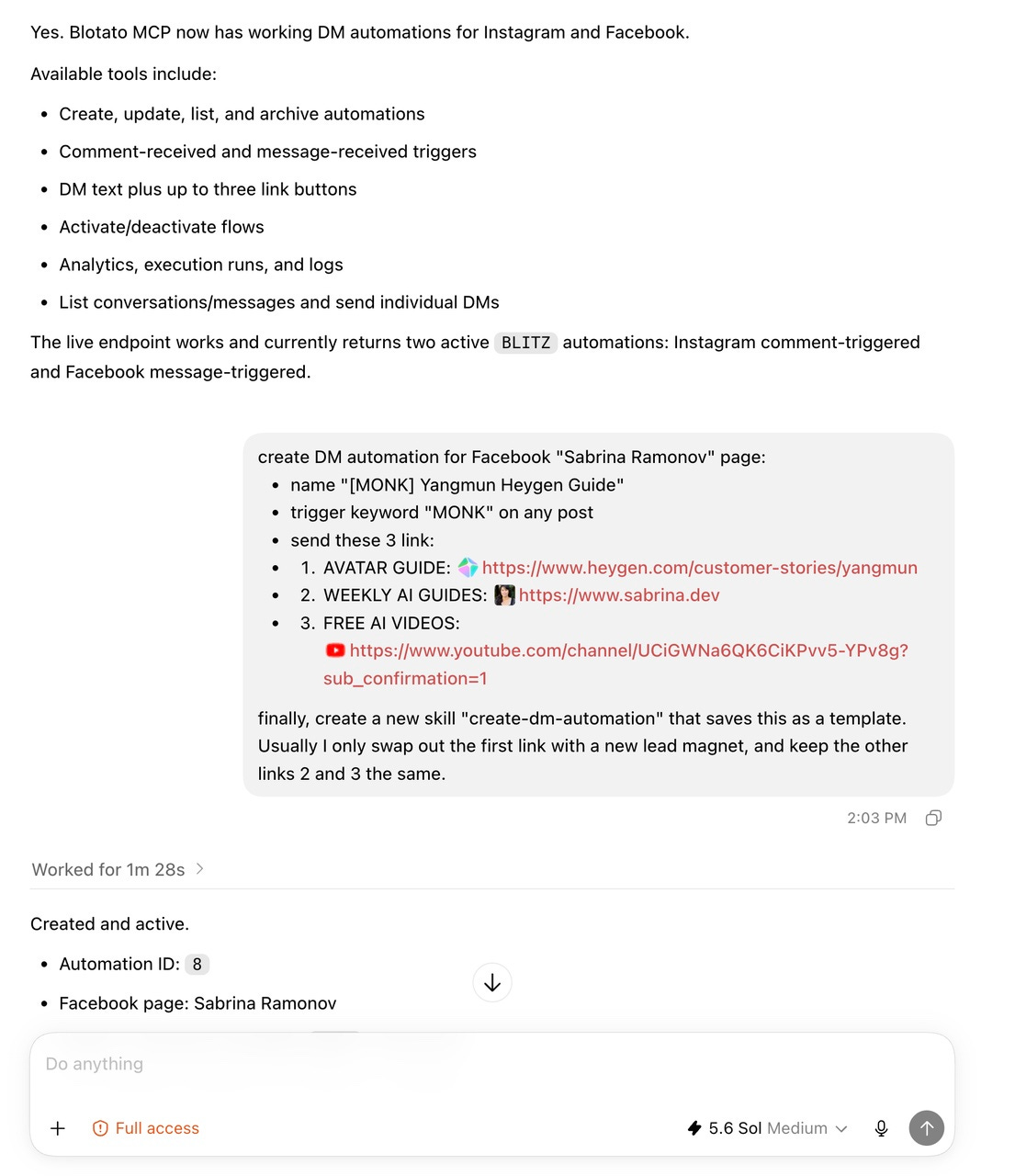
Step 3. (OPTIONAL) Capture Email and Send It to Your CRM
These steps are all OPTIONAL, but very handy:
Add an Email capture step.
Add Send webhook and paste your CRM webhook URL.
Test the full flow from another Facebook or Instagram account.
If your CRM does not provide a webhook, create one in Zapier, Make, or n8n.
Then connect Zapier, Make, or n8n to your CRM to create the contact.
Use this prompt:
Create a Facebook and Instagram DM automation. When someone comments GUIDE on any post, get their email, send my free guide [URL], and send a webhook to [WEBHOOK URL]. On Instagram, ask them to follow first.
Your test should do all 3:
The comment triggers a DM
The Instagram DM asks for a follow and an email
A new contact appears in your CRM
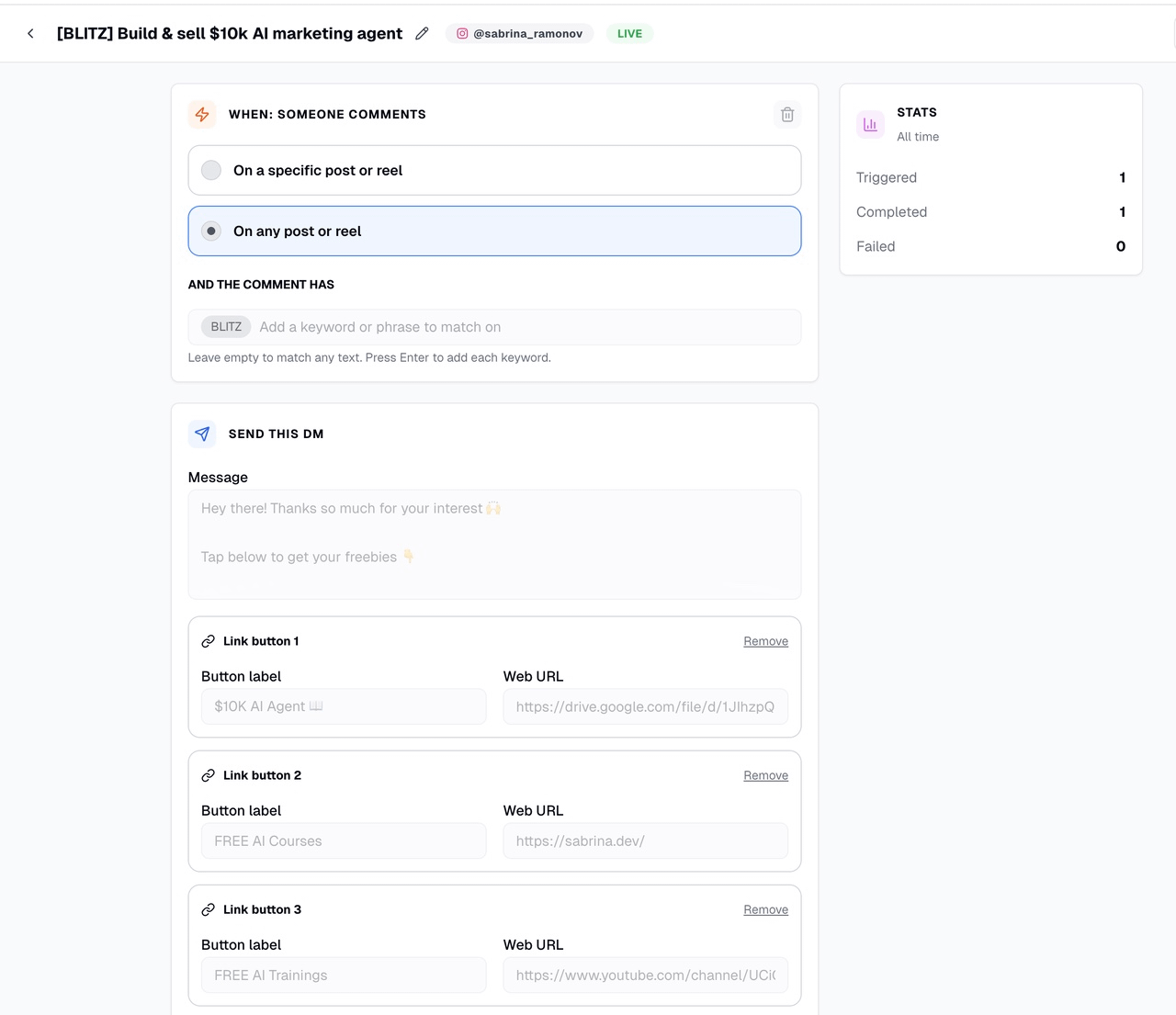
RECAP: Your Finished Flow
Keyword: ____________________
DM offer: ____________________
CRM webhook (optional): ____________________
Final check:
Facebook tested
Instagram tested
CRM contact created (optional)
NEXT-LEVEL USE CASES
Here are some next-level use cases you can do within Claude/ChatGPT to turbocharge your automations:
Create Multiple DM Automations from a Spreadsheet
Create multiple DM automations for Facebook and Instagram using this spreadsheet/CSV.
Update Many DM Automations at Once
Update all my DM automations so that the second link goes to: [URL]
Review DM Automation Analytics
Get my DM automation analytics for the past 30 days and tell me the top 3 winners.
A/B Test the Messages
Improve the copy in my last 3 DM automations to increase clicks.
Not Sure Where To Start? 👇
I’ve organized my best trainings below:
Subscribe to my Youtube and hit the “notification” bell
So that you never miss my free trainings 👇
Can we do the automation just by using Claude and not thru Blotato?
Hello Sabrina. I’m in Canada is blotato not available here. I can find it in the App Store.