

In case you missed it:
Most sales calls end with 4 fatal words:
“I’ll think about it.”
X_X
The client LIKED your offer, but they still don’t see why they should act NOW.
The trick?
Make the problem visible.
Then undeniable.
In this tutorial, you’ll build an interactive ROI calculator to close more sales:
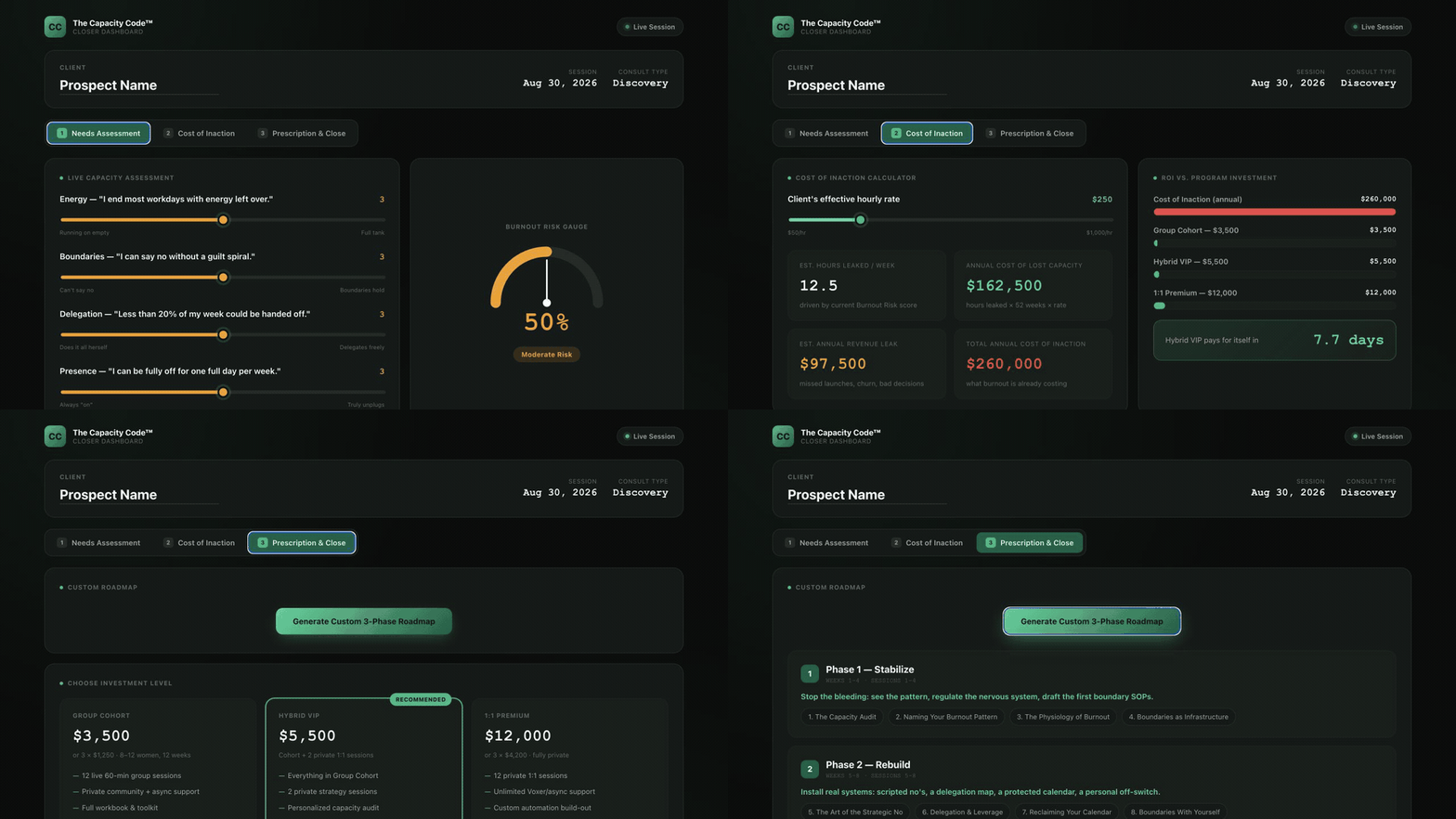
This ROI calculator will help uncover your client’s problem, price the cost of doing nothing, and turn that cost into a justified proposal.
To see a real example, go here, scroll down to section 3, and click “SEE REAL EXAMPLE”.
By the end, you’ll have a file named closer.html that you should share on your screen, talking through each step, during a live sales/discovery call.
But before AI can build it, AI needs to know what you sell…
1. Give AI Your Offer
First, name who you help and the problem they want to solve.
Then describe how your offer solves it and the costs.
Here’s a prompt to help you:
Ask me one question at a time about who I help, the problem I solve, how my program works, and what it costs. Then save my answers as a simple file named offer.html. Do not add anything I did not tell you.
Now your ideas become the source file for the calculator.
HTML is just a file that opens as a web page, so you don’t need to know how to code it yourself.
Next, we’ll open that file in Claude Cowork, Claude Code, ChatGPT Work, Hermes, or Grokbot.
It doesn’t matter which one.
Now AI knows what you sell, but it still needs instructions for turning your offer into a sales tool…
2. Build All Three Calculator Screens
Paste this prompt into your AI tool:
Create an interactive screen-share sales dashboard named closer.html. Style it as a modern executive dashboard with crisp cards, live calculators, and high-contrast typography.
Structure it into 3 interactive sections:
Live Needs Assessment: Client name header, 4 interactive sliders scoring capacity struggles with color-shifting indicators, and a real-time Burnout Risk Gauge.
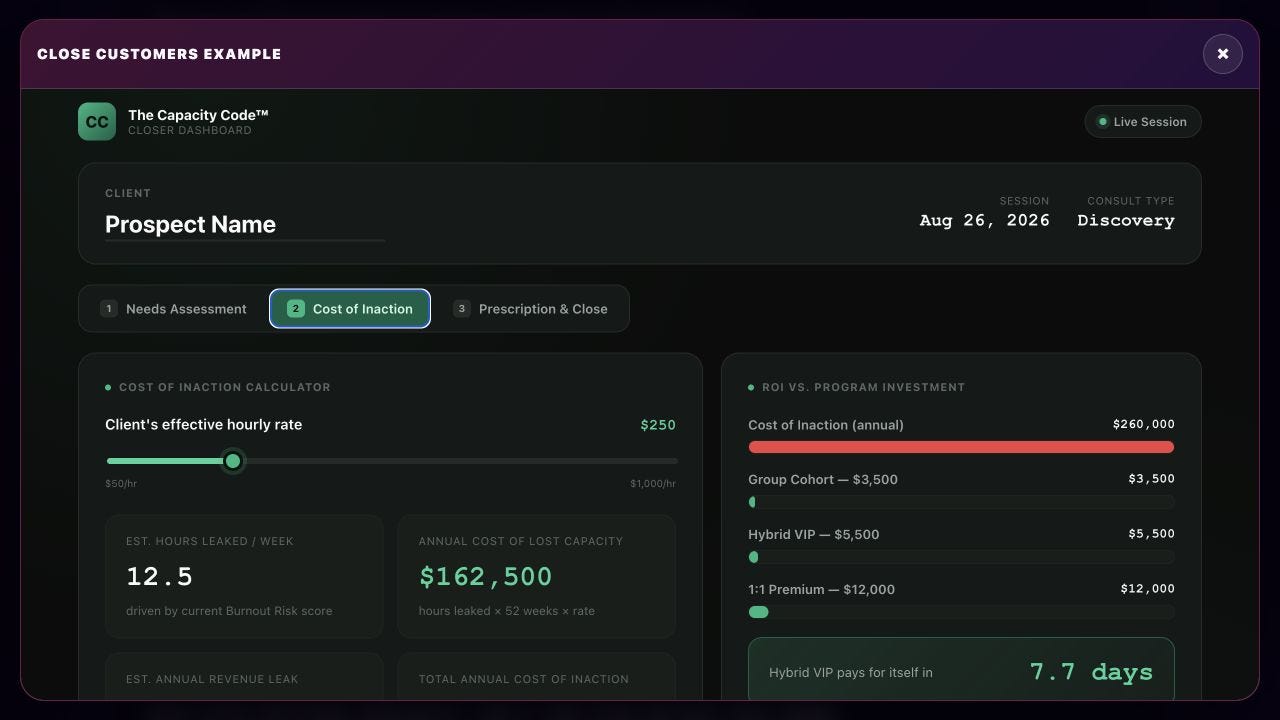
Cost of Inaction Calculator: Hourly rate slider calculating annual cost of lost capacity and revenue leaks live, paired with a side-by-side ROI comparison against my program price.
Prescription & Closer: A button to generate a custom 3-phase roadmap mapped from offer.html, clear pricing tiers, and an ‘Initiate Onboarding’ button.
That is the whole build request.
You do not need to add any code.
AI will make the first draft for you.
IMPORTANT:
Before you run it, change “capacity struggles” and “Burnout Risk” to match your offer.
For example, a fitness coach might use “health struggles” and “Health Risk,” while a sales coach might use “sales bottlenecks” and “Pipeline Risk.”
Then tell AI to open closer.html in your browser.
Move every slider and click every button.
Play with it!
If something fails, send AI a screenshot and say what you expected to happen.
Once everything works, the 1st screen uncover the problem.
But a problem alone does not create URGENCY, so let’s build the second screen which puts a price on waiting.
3. Price the Cost of Waiting
The client chooses an hourly rate and the number of hours they lose each week.
Those 2 inputs reveal an estimated yearly cost of lost time and missed revenue.
The calculator then places that cost beside your offer:
Keep every input conservative because this is a conversation, NOT a promise of guaranteed revenue.
Ask where each number came from, then adjust it until you both agree it is fair.
(Remember: you should be using this on a LIVE sales/discovery call so your client should be telling you what numbers to input)
Now the client can see THE COST OF INACTION!
But the numbers still leave one question open:
What happens if we work together?
The 3rd screen answers it with a plan :)
4. Turn the Cost Into a Clear Plan
Click “Generate Custom 3-Phase Roadmap.”
AI uses your program file to map the client’s needs into three clear phases.
Your client can now see the pain, the cost, and a path forward.
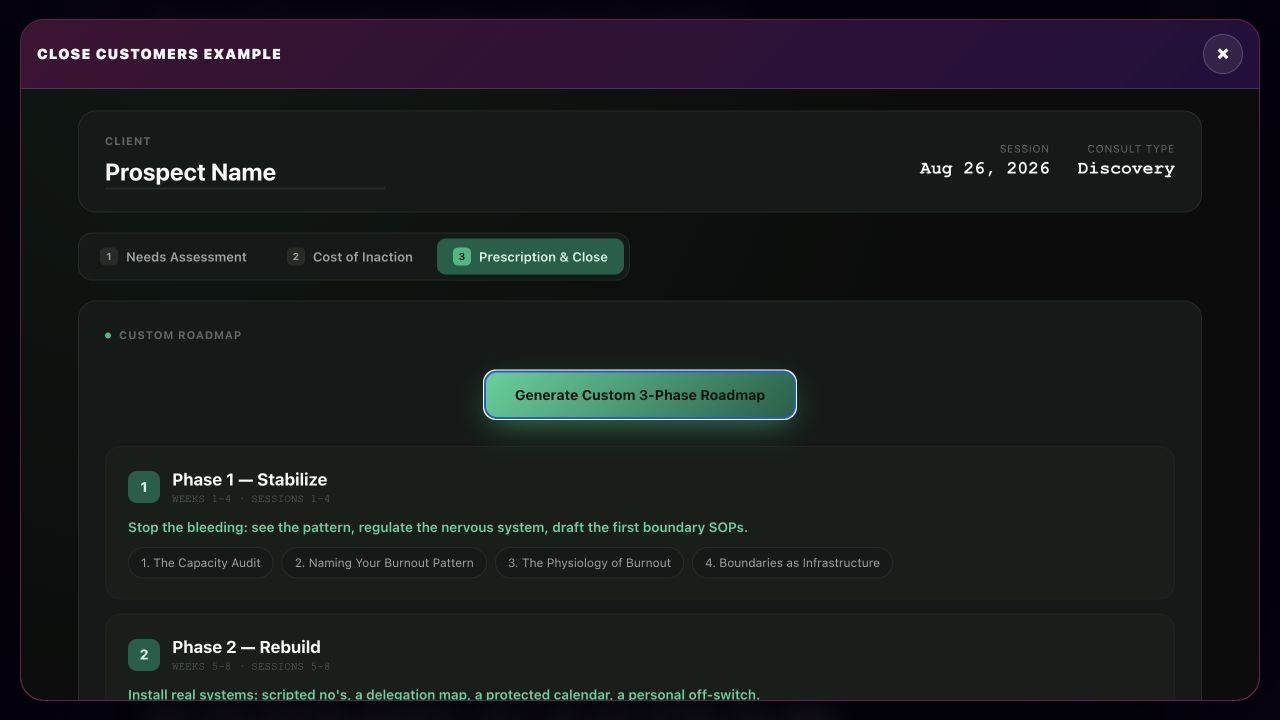
That’s the sequence you should follow in a sales call.
5. How to Use It With a Real Client
Share your screen and DISCUSS everything together:
DISCOVERY CALL FLOW
NEEDS → COST → ROADMAP → DECISION
Type the client’s name.
Let the client choose each “needs score”.
Agree on the hourly rate and lost hours.
Review the cost of doing nothing.
Generate the 3-phase roadmap.
Compare the plan and price with the problem you just measured.
Ask for objections
The point is NOT to use the calculator to pressure clients.
Use it to replace your vague sales pitch with a structured discussion, hard ROI numbers, and a plan you BOTH invested in creating together.
(Expert salespeople call this a “closing document” and it’s CRITICALLY important your client is INVOLVED making it!)
Test-drive the finished calculator on the AI Millionaire Blueprint page to see a real example. Scroll to section 3, Close Customers, and click “SEE REAL EXAMPLE.”
Then build your version before your next sales call!
Not Sure Where To Start? 👇
I’ve organized my best trainings below:
Subscribe to my Youtube and hit the “notification” bell
So that you never miss my free trainings 👇
IMPORTANT: I will NEVER ask you for money. I am NOT sending you friend requests. I am NOT on Whatsapp, Telegram, or messaging apps. I will NEVER sell a course. Always block & report scammers.
Wow this is genius Sabrina. Thank you and blatato for making life so easy and for always giving away so much value
Sabrina, I have an API for Blotato’s app and using it with Claude. It’s great. However I haven’t been able to log into the api with my email. There is no forgot email or password buttons. Could you make it easier to login after forgetting ?