

In case you missed it:
Claude Code edits your videos for free. You only pay for your Claude tokens. Take a look at what’s possible, with just a few good prompts:
My new Youtube video was 100% edited with Claude Code. The animations, text, graphics, sound effects, psychedelic theme, even the Claude UI screens you see. Claude made/edited all of it.
And the best part is it’s all “free”. Well, the only cost is your Claude tokens, but it’s MUCH cheaper than image/video generation. It also works with ChatGPT Codex, Grok Bot, Hermes, and Cursor.
By the end of this guide, you’ll have a full video creation and editing pipeline, Unlimited & Free (except tokens):
write a script
make video
edit video
post it
… all in Claude!
So how does it work?
It all starts with an open-source project…
1. What you’re setting up
Here’s the free tool that makes all of this easy.
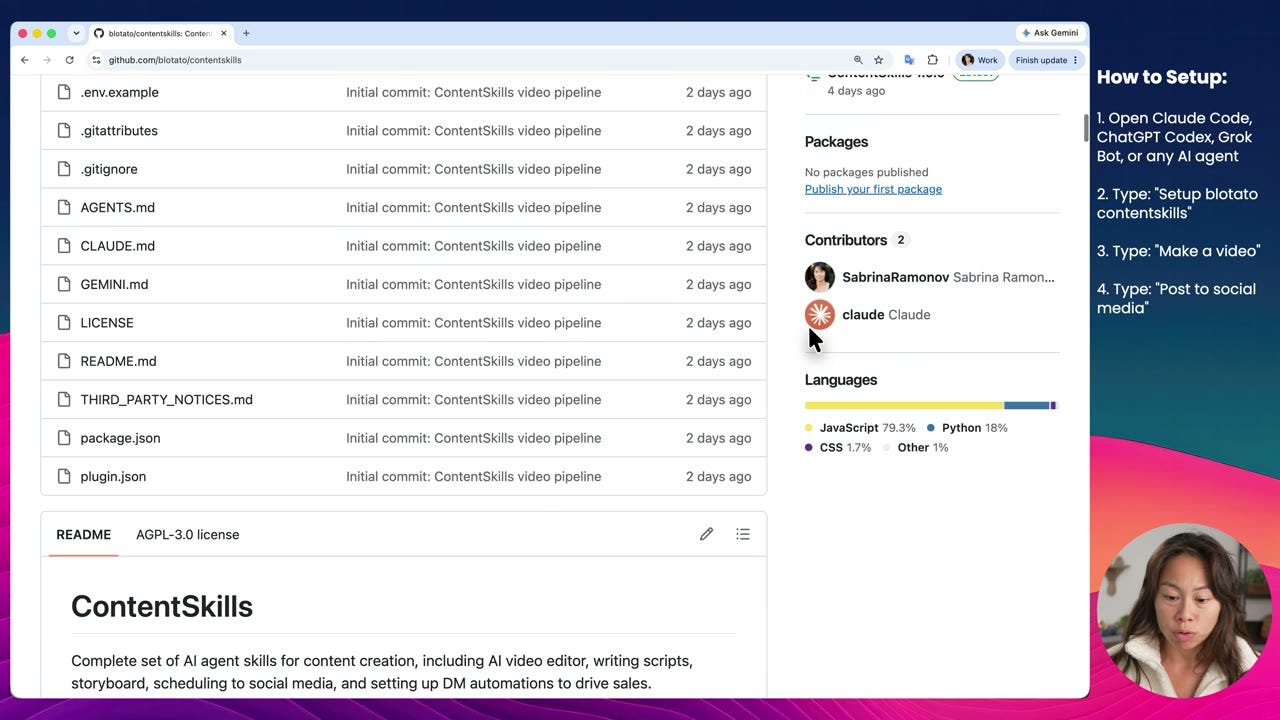
It’s my free, open source project called ContentSkills, which lets Claude Code:
Write your scripts
Create storyboards
Make faceless videos with free AI voices
Edit your raw video footage
Use 1000+ themes & video effects
Post everywhere to social media
It has 1000+ themes, transitions, effects, 3D, 2D, animations, etc. to pick from. And growing every day!
If this sounds overwhelming, the good news is you don’t need to write any code to set it up! You don’t need to be technical. You don’t need to be a video editor.
2. Set it up (no coding)
Good news - Claude does most of the work :)
Open Claude Code, ChatGPT Codex, Grok Bot, or Hermes.
Click Open folder and make a new folder to experiment in. This keeps all your work in one place.
Paste this prompt and press Enter:
Setup https://github.com/blotato/contentskillsClaude asks to install ffmpeg and Python. Even if these words look new to you, click Allow. They’re free tools that help Claude edit videos efficiently.
When Claude says the dashboard is live, click the link.
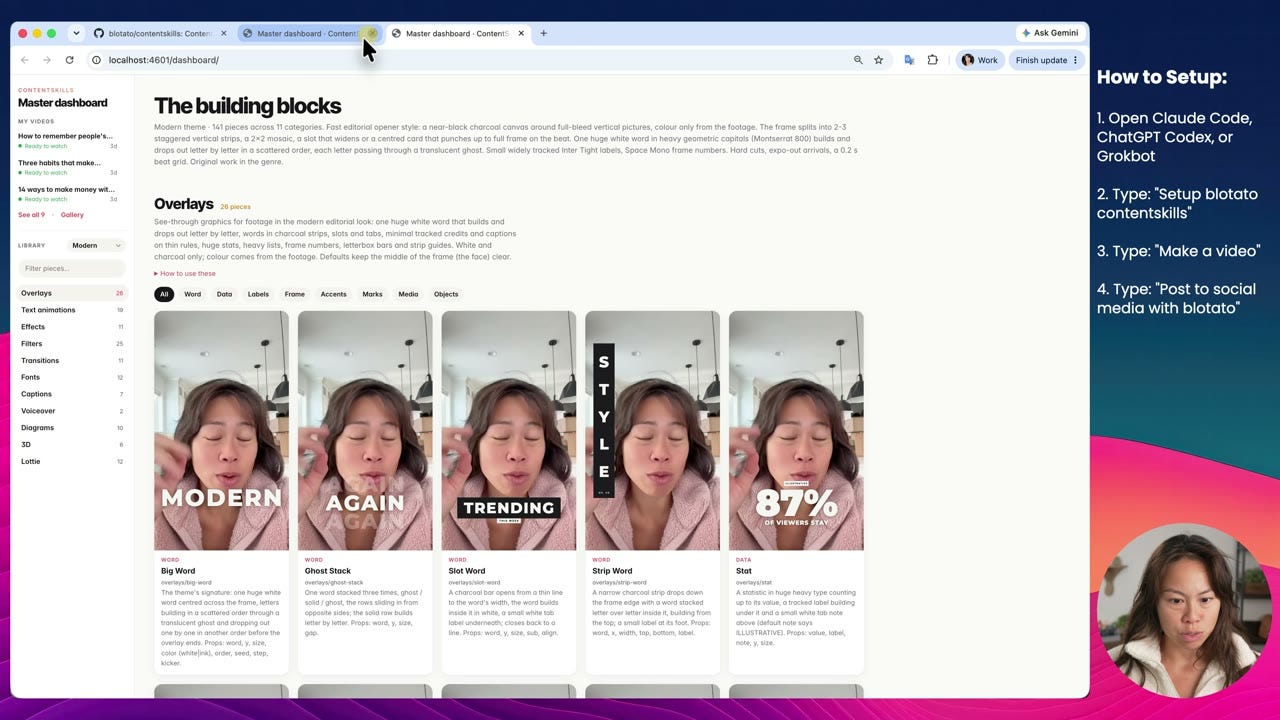
Think of the dashboard as your home base. All your videos show up here. In the left sidebar, browse styles like GTA6 or Modern, plus text animations, effects, filters, and transitions.
Now your home base is ready.
Next, here’s the trick I use every time I try something new.
3. My favorite trick: ask AI to teach you
You don’t need to know where to start. AI can teach you.
Whenever I try a new tool, I ask AI how to get started.
Try this prompt:
I’m a complete beginner. Can you walk me through how to make my first video?It asks you to pick one of 2 kinds of videos: a new faceless video or edit a raw video clip.
Let’s start with the faceless video, since you don’t even need to film anything.
4. Make a faceless video
This is the easiest way to see what Claude can do.
Paste this prompt:
Make a 10 second faceless video on this topic: the human brainClaude writes the storyboard first, you review it, then makes the final video with a free AI voice. Nothing gets made until you approve it!
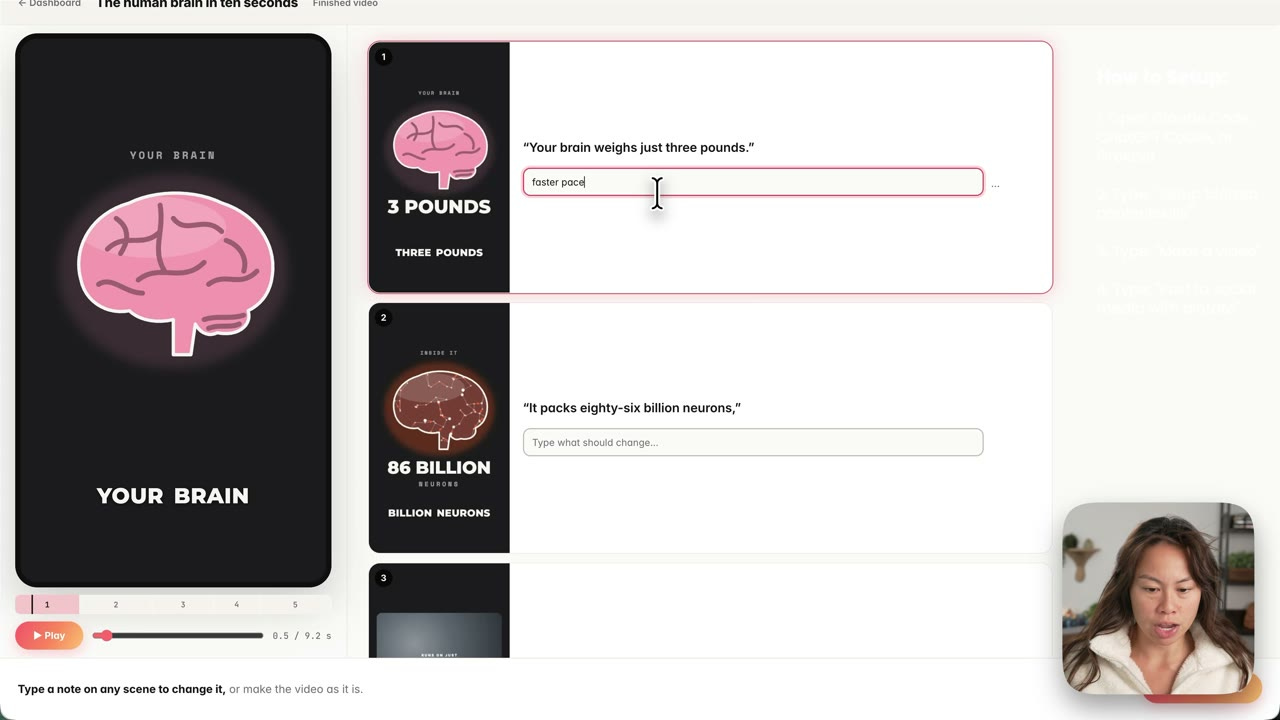
Type notes right on each scene in the storyboard. For example:
“Make this faster paced with more visual graphics.“
“I don’t like this style, make it more brain themed.“
“More sound effects here.“
Then click Send my notes in the bottom right corner, and paste them into Claude.
Claude will take a few minutes to update the storyboard with your feedback.
When all looks good, click Make my video.
Your first draft video is ready!
But what if one scene isn’t quite right?
That’s where the editor comes in…
5. Fix it in the video editor
This is my favorite part of the whole setup.
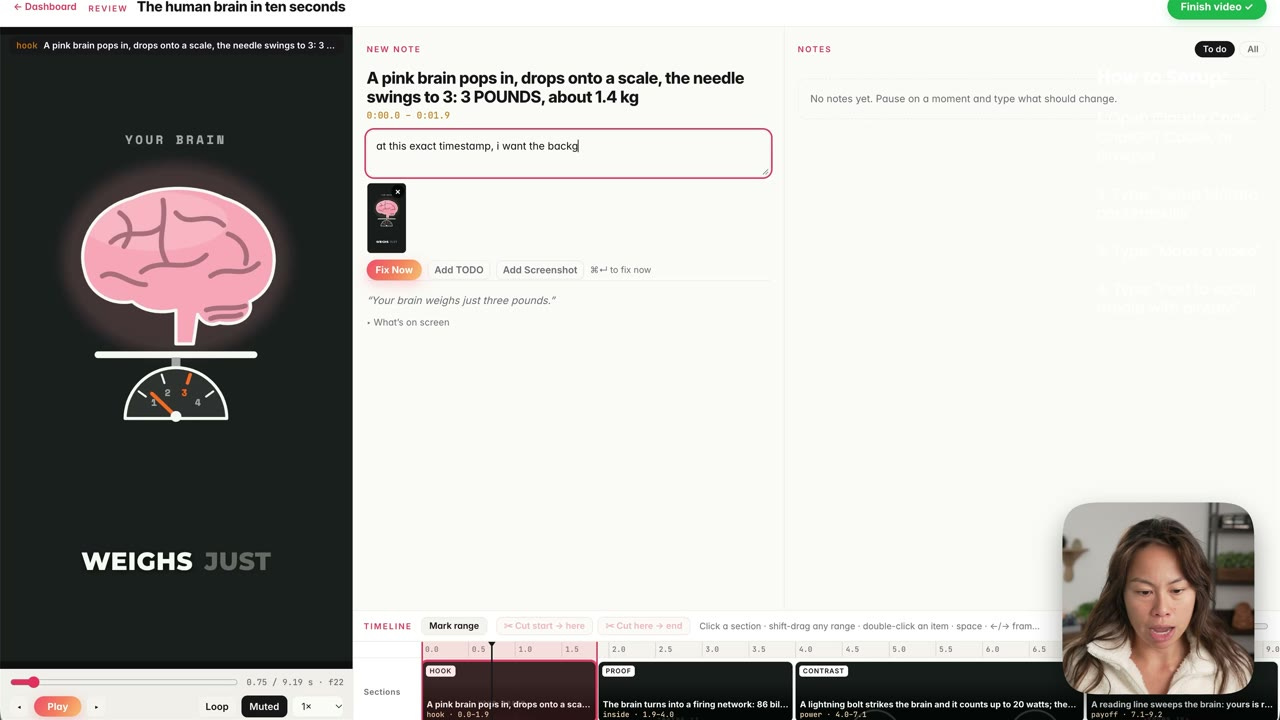
Claude Code doesn’t have a good visual interface for watching and editing videos.
This editor fixes that, it’s free, and Claude knows everything you do in it.
Click a scene. Click Add screenshot so Claude sees exactly what you see.
Type the change, like “make the background dark purple,” and press Command + Enter.
Do the same on another scene. Claude works on all your notes in parallel, so you don’t sit there waiting for 30 minutes.
Happy with it? Click Finish video in the top right corner to download the final video.
Faceless videos are fun.
But you can also do this with videos of yourself!
6. Edit your own talking video
If you’ve already have raw footage lying around, Claude can edit it for you.
It’s the same process. Just tell Claude where your video is and the style you want:
Edit [your file name] in my Downloads folder. Fast-paced, modern theme, big text effects, and cool animations.Love the style of an Instagram Reel? Paste its link, and Claude recreates that style.
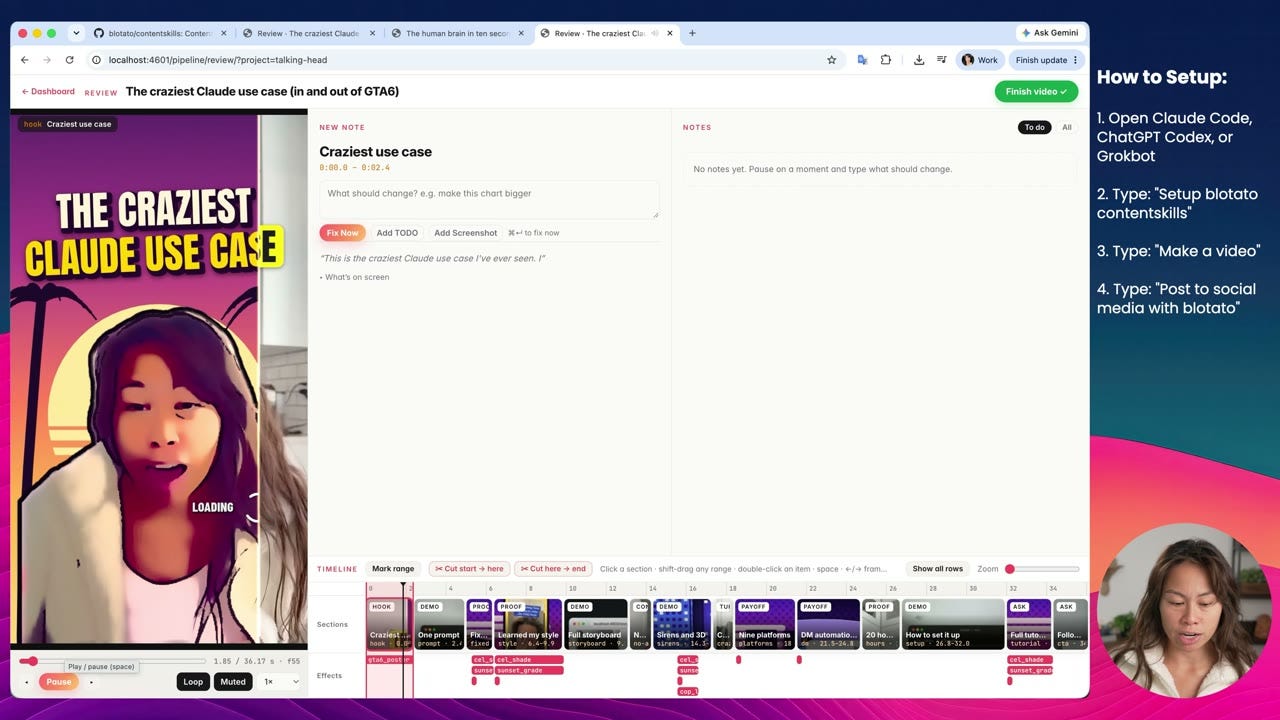
Claude Code edited this whole Youtube video. I didn’t do any of these edits. And honestly, I wouldn’t even know where to start if I had to do this myself because I’m the worst video editor on the planet.
But now we have 2 finished videos, one faceless and one talking head!
The final step is to hit PUBLISH…
7. Post it to socials
Making the video is only half the job.
Obviously, people need to see it!
The last step is posting to social media, without leaving Claude.
I built Blotato so I could delegate tedious stuff like social media scheduling to my AI agent. I regularly get 30+ million views a month.
Blotato is an official approved app and technology partner with all major social media platforms, so it’s a safe way to post with AI agents.
Sign up at blotato.com. Click Accounts to connect your socials.
In Claude, go to Plugins, search Blotato, click Add, then Approve access.
Test it:
Which social accounts do I have connected?Post your video:
Post the faceless video we made about the human brain to LinkedIn now.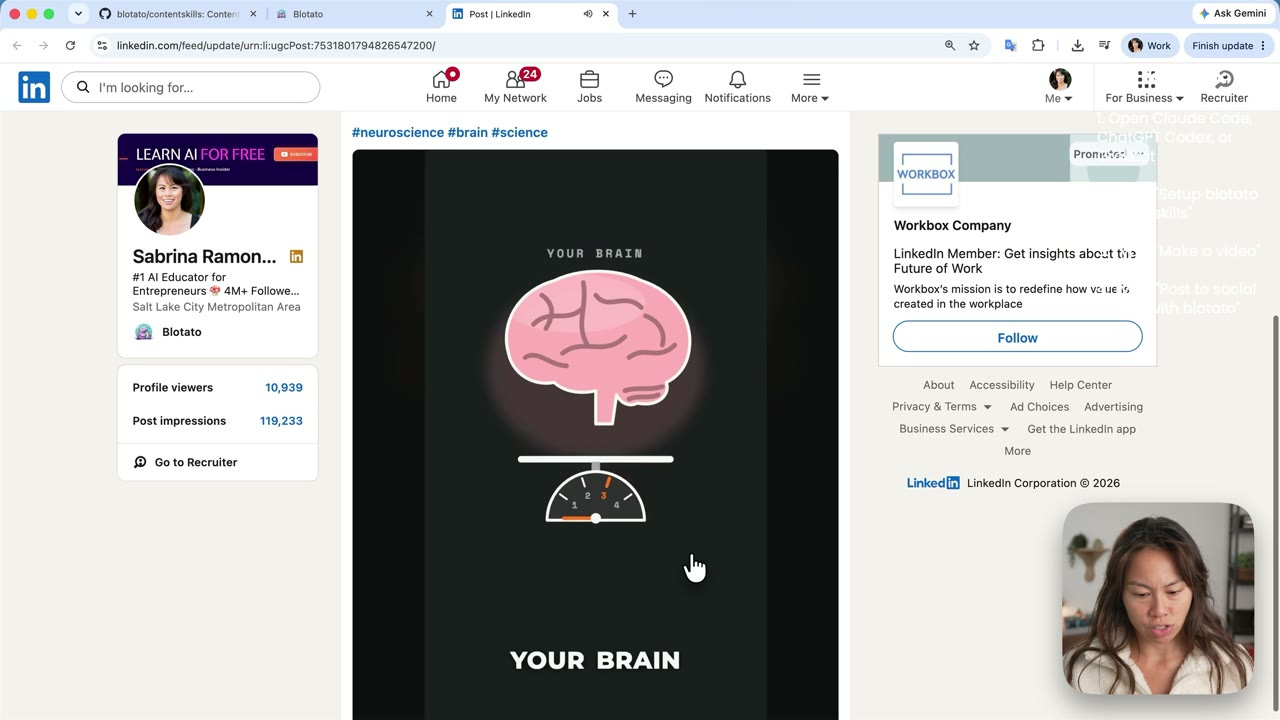
A few seconds later…
Boom, posted to LinkedIn!
You can also schedule posts for the future, post Instagram and Facebook stories, post Instagram trial reels, and set up Manychat-style DM automations with Blotato. The latter massively helps you gain followers fast on FB/IG and turn views into sales - when someone comments a keyword, they get your link/website/offer.
That’s the whole pipeline, start to finish.
Here’s a quick look back.
8. Recap
Here’s everything you did:
Tell Claude Code “setup blotato/contentskills”
Made a faceless video and put notes in the storyboard
Prompted fixes to scenes in the video editor
Edited a talking head video raw footage
Posted video to social media
You don’t need to be technical to do any of this.
Start with one faceless video, and see what Claude makes for you. Don’t hesitate to give it lots of feedback, reference styles, etc.
(50% off Black Friday deal expires soon)
Don’t miss my AI Video Editing masterclass - Tue Dec 1 @ 12pm PST, where I’ll show you live how to set this all up and make/edit videos with Claude Code. Add it to your calendar!
Not Sure Where To Start? 👇
I’ve organized my best trainings below:
Subscribe to my Youtube and hit the “notification” bell
So that you never miss my free trainings 👇
IMPORTANT: I will NEVER ask you for money. I am NOT sending you friend requests. I am NOT on Whatsapp, Telegram, or messaging apps. I will NEVER sell a course. Always block & report scammers.
Absolutely Awesome. Thank you for this Sabrina!
Edits living as code means the second video costs far less than the first. A timeline in a normal editor is a one-off, while a script that cuts, captions and adds effects can rerun on next week's footage with one message. That's where the hours actually pile up.